
Why consent‑aware browser agents matter now
Automated browsing isn’t just for scraping and QA anymore; it runs the modern software supply chain. CI robots load product pages to verify schemas, marketing bots pre‑render landing pages, and data tooling inspects pixels to ensure campaign tagging is correct. All of those actors are subject to the same consent law constraints as human users: no reading/writing non‑essential cookies, no third‑party tracking sans consent, and jurisdiction‑specific duties to respect universal signals like Global Privacy Control (GPC).
If your automation navigates without a consent posture, you’ll get noisy data at best and legal risk at worst. CMPs (Consent Management Platforms) add another layer: you must identify the CMP, understand the site’s consent model, and negotiate the UI correctly. Do it naïvely and you can trigger pre‑consent tags or accidentally grant broad permissions by clicking the wrong primary CTA.
This article outlines a practical, opinionated blueprint for building consent‑aware browser agents that:
- Parse IAB Europe TCF v2.2 and IAB US Privacy strings
- Negotiate major CMP UIs predictably and legally
- Persist per‑origin consent across sessions
- Detect and score dark patterns
- Test across vendors and site configurations at scale
- Train policies that minimize data collection while respecting user intent and jurisdictional rules
Important note: This is not legal advice. Treat it as an engineering plan you can align with counsel.
Regulatory primitives your agent must model
- EU/EEA and UK: GDPR + ePrivacy. Consent is the lawful basis for most marketing/advertising and non‑essential cookies. IAB TCF v2.2 specifies how CMPs encode user choices into a compact string (“TC string”).
- US state privacy laws (e.g., CPRA): Opt‑out regimes with disclosures. The IAB U.S. Privacy String v1 encodes several signals for CCPA/CPRA‑aligned flows. Many sites are migrating to IAB GPP (Global Privacy Platform), which generalizes multi‑jurisdiction signals; support it if your footprint includes multiple US states or Canada.
- Universal signals: Global Privacy Control (GPC). If GPC is set, you must interpret it as a user opting out of sale/sharing (in CPRA contexts) and often as a strong preference to minimize tracking.
“Legal and predictable” means:
- No circumvention. Don’t inject CSS to hide banners, don’t manipulate DOMs to produce a consent that the CMP didn’t present.
- Honor default states. If a site blocks non‑essential tags by default, don’t force‑load them just to check analytics.
- Be deterministic. Same input (jurisdiction, user preference) yields same outputs (which buttons clicked, which strings produced).
- Auditable. Persist decisions and evidence: screenshots, network timelines, TC/US strings, and a cryptographic hash of the session artifacts.
A systems architecture for consent‑aware automation
Think of the agent as a privacy middleware for your headless browser:
- Context builder
- Determine jurisdiction and regulatory posture: IP geolocation or explicit test settings; set Accept‑Language and time zone; emit GPC headers if the user has opted in to that signal.
- Configure network policies: blocklist known trackers until consent, or rely on site gating. Capture cookies/Set‑Cookie and localStorage writes from the start.
- CMP detection and identification
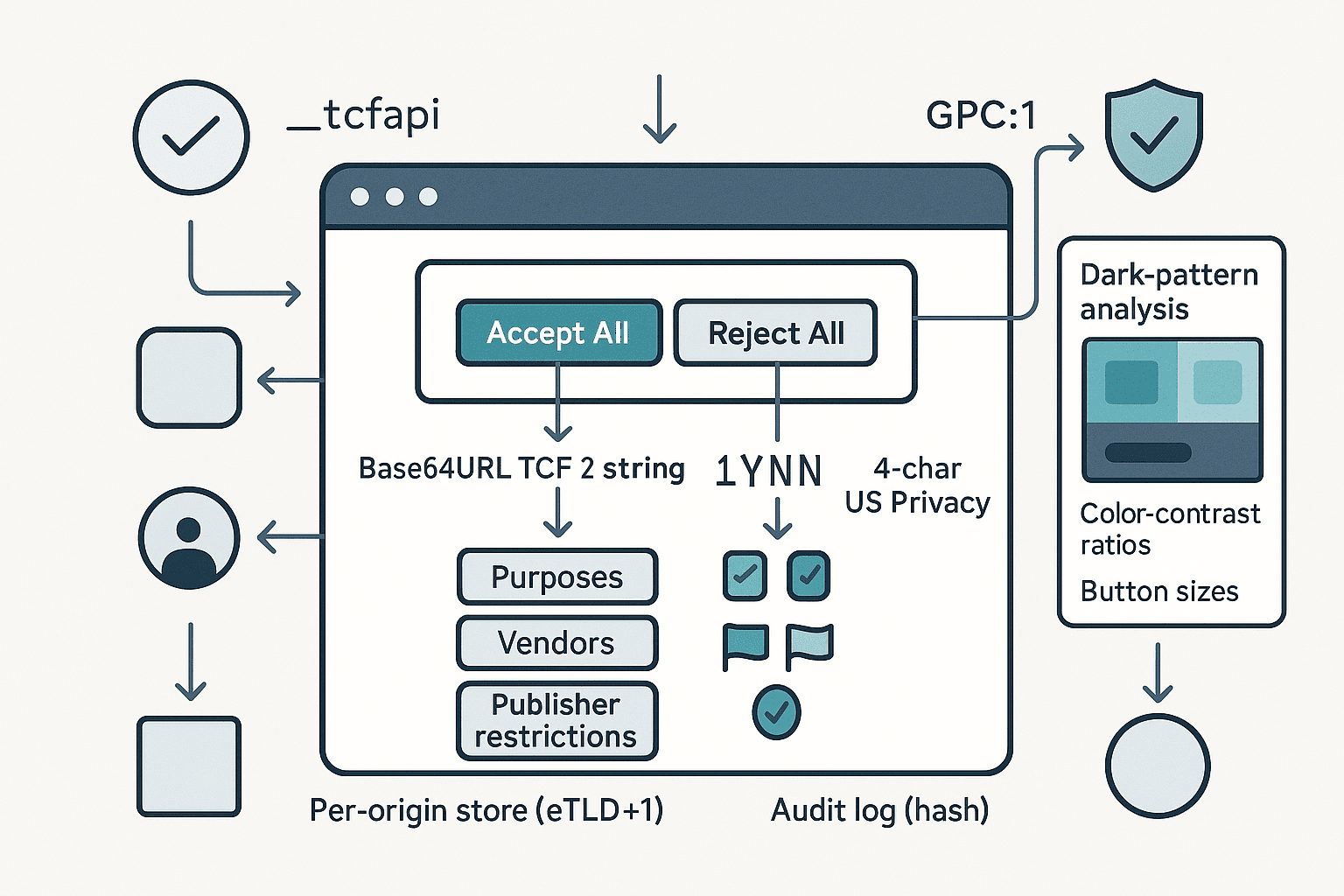
- Look for window.__tcfapi and window.__uspapi; subscribe to readiness events.
- Probe DOM for known CMP fingerprints: CSS class names (e.g., didomi‑popup, onetrust‑banner, qc‑cmp2‑container), data‑cmp attributes, shadow roots used by vendors like Sourcepoint/Usercentrics.
- If none found, fall back to heuristic banner detection: bottom‑fixed containers with button clusters; text containing “cookies”, “consent”, “privacy”.
- Policy engine
- Inputs: user preference profile (e.g., Reject all unless Strictly Necessary), jurisdictional rules, GPC state, enterprise overlays (e.g., do not allow Legitimate Interest wherever optional), and site exceptions.
- Output: a target consent state: per‑purpose and per‑vendor choices, with a fallback action sequence (Reject All if present; else Manage Options → disable everything → Save).
- Negotiation executor
- Drive the UI using robust selectors and text patterns across locales; support shadow DOM and iframes; retry on hydration delays.
- Avoid accidental acceptance: never click the visually primary button without verifying its label semantics.
- Consent readers
- Read TCF tcString and US Privacy string via APIs and DOM (e.g., cookies/localStorage). Verify they match the intended policy.
- Dark‑pattern analyzer
- Compute heuristics: contrast ratios, action asymmetry (click depth, size, color salience), ambiguous text, mis‑ordered toggles.
- Emit a score and annotate screenshots for review.
- Persistence and auditing
- Maintain a per‑origin store keyed by registrable domain (eTLD+1) and jurisdiction. Keep: intended policy, observed strings, timestamps, CMP id/version, screenshots, network evidence, and a session hash.
- Test harness
- A matrix of CMP vendors/themes, locales, and site shells. Run regression suites to guarantee stable behavior.
Working with TCF v2.2 at the protocol level
The TCF v2.x tcString is a Base64URL‑encoded bitfield with dot‑separated segments. The first segment (core) includes versioning and high‑level choices; subsequent segments record vendor disclosures/allowances and publisher restrictions.
Common fields you’ll read:
- Versioning and timestamps: policyVersion, cmpId, cmpVersion, created, lastUpdated.
- Scope: isServiceSpecific, purposeOneTreatment, publisherCC (country code).
- User choices:
- specialFeatureOptIns (2 bits currently used for features like precise geolocation)
- purposesConsent (bitset by purpose ID)
- purposesLITransparency (transparency bits about legitimate interest, where applicable)
- Vendor scopes:
- vendorConsents (bitset or range encoding)
- vendorLegitimateInterests (where applicable)
- Publisher restrictions: per purpose/vendor restrictions encoding the allowed legal bases.
Two practical rules for v2.2:
- Vendor behavior is constrained by the Global Vendor List (GVL). Your agent should fetch/cache the relevant GVL version noted in the tcString to interpret purposes correctly. Do not assume purpose counts or semantics; read them from the GVL.
- Legitimate interest (LI) remains nuanced. Vendors may or may not be allowed to rely on LI for certain purposes depending on the policy version and GVL entries. Your agent should prefer consent over LI when a user policy is “minimize tracking,” and verify publisher restrictions that disallow LI.
Your best bet is to use a well‑maintained parser for compliance‑critical reads, then optionally do a manual decode for cross‑validation in tests.
- JavaScript: iabtcf/core (TCString class) can parse segments.
- Python: iab‑tcf (community) or a small custom decoder if you only need core fields.
Example: reading the tcString through the __tcfapi
js// Wait for CMP and read the consent data via the TCF API
async function getTCData(page) {
  return await page.evaluate(() => new Promise((resolve) => {
    function onReady() {
      window.__tcfapi('getTCData', 2, (tcData, success) => {
        resolve(success ? tcData : null);
      });
    }
    if (typeof window.__tcfapi === 'function') {
      window.__tcfapi('addEventListener', 2, (tcData, success) => {
        if (success && (tcData.eventStatus === 'tcloaded' || tcData.eventStatus === 'useractioncomplete')) {
          onReady();
        }
      });
      // fallback if event listener is not implemented
      setTimeout(onReady, 1500);
    } else {
      resolve(null);
    }
  }));
}
Minimal manual decode of the core segment (for testing only)
pythonimport base64

# Base64URL decode without padding

def b64url_decode(segment: str) -> bytes:
    pad = '=' * ((4 - len(segment) % 4) % 4)
    return base64.urlsafe_b64decode(segment + pad)

# Extract bits MSB-first

def read_bits(buf: bytes, offset: int, length: int) -> int:
    acc = 0
    for i in range(length):
        byte_idx = (offset + i) // 8
        bit_idx = 7 - ((offset + i) % 8)
        acc = (acc << 1) | ((buf[byte_idx] >> bit_idx) & 1)
    return acc

# Example: parse just version and cmpId from core segment

def parse_tcf_core(tc_string: str) -> dict:
    core = tc_string.split('.')[0]
    buf = b64url_decode(core)
    o = 0
    version = read_bits(buf, o, 6); o += 6
    created = read_bits(buf, o, 36); o += 36
    last_updated = read_bits(buf, o, 36); o += 36
    cmp_id = read_bits(buf, o, 12); o += 12
    cmp_version = read_bits(buf, o, 12); o += 12
    # ... continue per spec as needed
    return {"version": version, "cmpId": cmp_id, "cmpVersion": cmp_version,
            "created": created, "lastUpdated": last_updated}
Use a verified library for production logic; the above helps debug mis‑encodings.
US Privacy string (IAB CCPA/CPRA) basics
The US Privacy string v1 is a compact 4‑character value, typically found in the uspapi or in cookies like usprivacy. It encodes:
- Char 1: Version (currently "1")
- Char 2: Explicit notice given? ("Y"/"N"/"-")
- Char 3: Opt‑out of sale/sharing? ("Y"/"N"/"-")
- Char 4: LSPA covered transaction? ("Y"/"N"/"-")
Parsing it is straightforward:
pythondef parse_us_privacy(s: str) -> dict:
    if not s or len(s) < 4:
        raise ValueError('Invalid US Privacy string')
    return {
        'version': s[0],
        'notice_provided': s[1],      # 'Y', 'N', or '-'
        'opted_out_sale': s[2],       # 'Y', 'N', or '-'
        'lspa_covered': s[3],         # 'Y', 'N', or '-'
    }
As with TCF, prefer the official API when available:
jsasync function getUSPData(page) {
  return await page.evaluate(() => new Promise((resolve) => {
    if (typeof window.__uspapi === 'function') {
      window.__uspapi('getUSPData', 1, (data, success) => resolve(success ? data : null));
    } else {
      resolve(null);
    }
  }));
}
Note: Many sites are adopting IAB GPP (e.g., Section 7 for US state signals). If your scope includes multiple US states, migrate your agent to read the GPP string and decode the relevant sections.
GPC and signaling setup
Before loading any page content, decide and signal your privacy posture:
- Global Privacy Control: send Sec-GPC: 1 as a request header and expose navigator.globalPrivacyControl = true.
- Block until posture set: configure your automation to set these before the first navigation to avoid early tracking.
Playwright example:
tsimport { chromium } from 'playwright';

const browser = await chromium.launch();
const context = await browser.newContext({
  extraHTTPHeaders: { 'Sec-GPC': '1' },
  locale: 'en-US',
});
const page = await context.newPage();
await page.addInitScript(() => {
  Object.defineProperty(navigator, 'globalPrivacyControl', { value: true });
});
Negotiating CMP UIs without getting trapped by dark patterns
CMPs vary, but the core strategy is consistent:
- Primary goal: reach a final state where non‑essential processing is off unless the policy allows otherwise.
- Preference order: if a clear “Reject All” exists, click it. Else prefer “Manage Options/More Options” to avoid accidental acceptance, then disable categories and vendors, then “Save/Confirm Choices”. Avoid “Accept” or misleading “Continue” buttons.
Robust interaction tactics
- Label‑first selection: search visible and accessible names across locales. Build a dictionary for common strings: Reject, Decline, Disagree, Only Necessary, Save Choices, Confirm Choices, Manage Settings, More Options.
- Shadow DOM and iframes: many CMPs render inside a shadow root or a same‑origin iframe. Traverse using Playwright’s frame API and elementHandle.evaluateHandle for shadow roots.
- Wait for hydration: frameworks often attach handlers after a delay. Wait for stable bounding boxes and non‑detached nodes.
- Verify text semantics: never click based solely on role=button or primary styling. Confirm button purpose by inspecting innerText and aria‑label.
Playwright sketch for a safe “reject first” strategy
tsasync function tryRejectAll(page) {
  const labels = [
    'Reject All', 'Reject all', 'Decline All', 'Decline', 'Disagree',
    'Only Necessary', 'Use necessary only', 'Tout refuser', 'Alle ablehnen',
    'Solo necesario', 'Solo necesarias', 'Nur notwendige', '拒否', '拒绝',
  ];

  // search top document
  for (const text of labels) {
    const el = await page.locator(`button:has-text("${text}")`).first();
    if (await el.count()) {
      await el.click({ timeout: 0 });
      return true;
    }
  }

  // search iframes (same-origin)
  for (const frame of page.frames()) {
    for (const text of labels) {
      const el = frame.locator(`button:has-text("${text}")`).first();
      if (await el.count()) {
        await el.click({ timeout: 0 });
        return true;
      }
    }
  }
  return false;
}

async function manageAndDisable(page) {
  const manageLabels = ['Manage options', 'Manage settings', 'More options', 'Settings', 'Cookie settings'];
  for (const m of manageLabels) {
    const el = await page.locator(`button:has-text("${m}")`).first();
    if (await el.count()) { await el.click(); break; }
  }
  // Now toggle off all categories/vendors
  const toggles = page.locator(['[role="switch"][aria-checked="true"]', 'input[type="checkbox"][checked]'].join(','));
  const n = await toggles.count();
  for (let i = 0; i < n; i++) {
    const t = toggles.nth(i);
    await t.click({ force: true });
  }
  // Save choices
  const saveLabels = ['Save choices', 'Save & exit', 'Confirm choices', 'Confirm my choices'];
  for (const s of saveLabels) {
    const el = await page.locator(`button:has-text("${s}")`).first();
    if (await el.count()) { await el.click(); break; }
  }
}
CMP vendor fingerprints you can leverage
- OneTrust: #onetrust-banner-sdk, .onetrust-close-btn-handler, __tcfapi shim often injected.
- Didomi: .didomi‑popup‑container, window.Didomi.
- Usercentrics: uc‑cmp, shadow roots, window.UC_UI.
- Quantcast Choice: .qc‑cmp2‑container.
- TrustArc: #truste‑consent‑required, window.truste.
- Sourcepoint: sp_ prefixes, __tcfapi with custom cmpId.
Use the vendor id (tcData.cmpId) to enrich your logic and testing.
Persisting consent per origin (and proving it)
Your agent should converge to a stable consent posture for a registrable domain (eTLD+1). Good practices:
- Keying: use the Public Suffix List to compute eTLD+1. Keep separate entries per jurisdiction and per user profile (e.g., Strict vs Balanced).
- What to store:
- Intended policy: purposes allowed/denied, LI stance, US opt‑out preference.
- Observed signals: tcString, usprivacy string (or GPP section), CMP id/version.
- Evidence: screenshot before/after, network log of Set‑Cookie pre/post consent, list of storage writes.
- Result: accepted/rejected vendors and purposes derived from decoding strings against the matching GVL.
- Reuse: on subsequent visits, you can short‑circuit negotiation if the CMP stored the same state and the strings match the intended policy. Always verify, don’t assume.
- Audit: write a JSON record and an SHA‑256 hash. For sensitive flows, attach a signed timestamp (e.g., RFC3161 TSA or a transparency log) to demonstrate integrity.
Detecting and scoring dark patterns
Design an analyzer that assigns a dark‑pattern risk score. Heuristics that work well in practice:
- Asymmetry of effort (click cost): difference in interactions required to Accept All vs Reject All. Score = minClicks(Reject) − minClicks(Accept). Penalize if > 1.
- Visual salience imbalance:
- Button size ratio: area(Accept)/area(Reject). Penalize if > 1.5.
- Color contrast vs background: compute WCAG contrast; penalize if Accept has higher contrast by > 30%.
- Positioning: Accept in primary position with Reject secondary and distant; penalize if not co‑located.
- Misleading language: labels like “Continue” that imply navigation rather than consent; score if Accept path is framed as necessary.
- Pre‑ticked toggles: if non‑essential categories are on by default; significant penalty under GDPR norms.
- Non‑compliance cues: storage writes prior to any interaction for non‑essential cookies; heavy penalty and flag.
Computing contrast ratio (example):
tsfunction luminance([r, g, b]: number[]) {
  const a = [r, g, b].map(v => {
    v /= 255;
    return v <= 0.03928 ? v/12.92 : Math.pow((v+0.055)/1.055, 2.4);
  });
  return 0.2126*a[0] + 0.7152*a[1] + 0.0722*a[2];
}
function contrast(c1: number[], c2: number[]) {
  const L1 = luminance(c1) + 0.05, L2 = luminance(c2) + 0.05;
  return (Math.max(L1, L2) / Math.min(L1, L2));
}
Apply these to computed styles for the Accept and Reject buttons and to their containers.
Output a JSON report:
json{
  "cmpId": 123,
  "asymmetryClicks": 2,
  "buttonSizeRatio": 1.8,
  "contrastAccept": 4.5,
  "contrastReject": 2.8,
  "preTicked": true,
  "storageBeforeConsent": ["_ga", "fbp"],
  "riskScore": 0.77,
  "evidence": {"beforeScreenshot": "s3://...", "afterScreenshot": "s3://..."}
}
Tune the riskScore with weights validated across a labeled corpus of CMP snapshots.
Verifying behavior: network and storage checks
- Network gatekeeping: listen for response headers Set‑Cookie from known trackers before consent; any pre‑consent third‑party cookies should be flagged.
- Client storage: snapshot document.cookie, localStorage, sessionStorage, and IndexedDB before and after consent.
- Pixel firing: detect requests to common endpoints (e.g., Google Ads/Analytics, Facebook, Criteo) and classify as essential vs marketing.
- Consent mode interactions: if Google Consent Mode v2 is present, verify that gcs/gcd/gcl signals reflect your choices and that ad_storage/analytics_storage are denied when rejecting.
Playwright intercept sketch:
tspage.on('response', async (resp) => {
  const setCookie = resp.headers()['set-cookie'];
  if (setCookie) {
    const url = new URL(resp.url());
    const domain = url.hostname;
    const thirdParty = !page.url().includes(domain);
    if (thirdParty) {
      // log third-party cookie before consent completion
    }
  }
});
Testing across vendors and themes
Create a fixture matrix combining:
- CMP vendors: OneTrust, Didomi, Usercentrics, Quantcast Choice, Sourcepoint, TrustArc, CookieYes, Civic UK, Axeptio, Cookiebot, etc.
- Layouts: bottom bar, modal center, full‑screen wall, sidebar.
- Locales: at least EN/FR/DE/ES/IT/JA/ZH.
- Themes: light/dark, high‑contrast.
- Jurisdictions: EU/UK/US‑CA/US‑non‑CA.
For each fixture, run:
- GPC on/off paths
- Reject‑first and Manage‑then‑disable paths
- Verify tcString/usprivacy match intended policy
- Assert no non‑essential storage or third‑party cookies before consent
- Score dark patterns and compare to baseline
Persist golden screenshots, tcString decodes, and network deltas. Fail CI if diffs exceed tolerance.
Designing the policy engine to minimize data collection
Start with a clear opinionated default: minimal collection unless required to accomplish core functionality or explicitly permitted by the user profile. This generally means:
- EU/UK: deny all purposes except “Strictly Necessary,” with special feature opt‑ins off. Prefer explicit consent over legitimate interest where both are present.
- US CPRA: set the opt‑out of sale/sharing to “Y” (true) when the user chooses “do not sell/share”.
- Global Privacy Control: if GPC is present and the site claims CPRA coverage, treat as an opt‑out regardless of banner visibility.
Rule‑based baseline
- If a “Reject All” button is available and visible, click it; then verify tcString.purposesConsent is all zeros (except necessary) and specialFeatureOptIns empty.
- Else, drill into settings, disable categories, and save; verify.
- If verification fails, retry once; if still failing, escalate to manual or mark as non‑compliant.
Learning‑assisted policies (optional, for at‑scale variability)
A reinforcement learning (RL) or bandit layer can fine‑tune the sequence of interactions across CMP variants to minimize tracking while ensuring completion speed and success.
- State features: detected CMP id/version, language, presence/labels of candidate buttons, DOM tree embeddings for the banner region, computed dark‑pattern metrics.
- Actions: choose action sequences like [RejectAll], [Manage→Disable→Save], [Scroll→Reject], [ExpandVendors→Disable→Save].
- Reward: negative weight for each purpose/vendor left enabled, penalty for third‑party cookies or marketing pixels fired, small penalty for steps/time, heavy penalty for verification failure.
- Constraints: hard rules to prevent illegal behavior (never click ambiguous Accept; never hide banners; never inject consent strings).
- Evaluation: off‑policy evaluation using logged data from the rule‑based baseline; A/B in your test harness; deploy only if policy monotonically reduces tracking without increasing failures.
Minimizing data while protecting reliability
- Post‑consent verification is mandatory; never trust a single click.
- Treat LI fallback as opt‑out if your user profile is “minimal”; if the publisher restrictions allow LI where consent is denied, prefer flows that disable vendor participation in those purposes.
- Where GPP is used, ensure all relevant sections align (e.g., US‑CA, US‑VA, etc.).
Edge cases and mitigation strategies
- No CMP detected, but tracking occurs: flag as non‑compliant (EU/UK) or respect GPC opt‑out (US CPRA) and block third‑party tracking client‑side if your agent’s mission allows it. Otherwise, abort the test.
- Consent walls: some publishers gate content on consent. If your user profile is strict, your agent should record the wall and decline, unless business policy allows a balanced mode (e.g., permit measurement only).
- Async CMPs loading late: intercept early storage and network calls; if non‑essential tracking starts before CMP displays, record a violation.
- Shadow‑DOM exotic structures: fall back to geometry‑based click regions only if the semantics are clear; otherwise, mark as uncertain and do not click.
- Non‑IAB frameworks: parse whatever signal the CMP writes (e.g., JSON in localStorage) and translate to your internal consent model; maintain vendor mappings.
Security, compliance, and ethics
- Don’t spoof users. Your agent should act on behalf of a declared user preference or a documented test persona.
- Avoid cross‑site contamination: run tests in fresh contexts; isolate storage and proxies per run.
- Safeguard logs: consent artifacts can contain identifiers; treat as sensitive data with limited retention.
- Respect robots and terms for test crawling; use allowlists and rate limits.
Putting it together: an end‑to‑end flow
- Initialize context
- Set Sec-GPC: 1 if enabled; define navigator.globalPrivacyControl.
- Configure locale and test IP to target jurisdiction.
- Start network/storage capture.
-
Navigate to target URL
-
Detect CMP
- Await __tcfapi/.__uspapi or banner heuristics.
- Identify vendor and version if possible.
- Decide strategy
- From policy engine: RejectAll path if visible; else Manage path.
- Execute negotiation
- Click sequence with semantic verification; support iframes/shadow DOM.
- Take before/after screenshots of the banner region.
- Verify consent
- Read tcData/usprivacy; decode and compare to intended policy and GVL.
- Confirm no non‑essential storage/network before consent; confirm post‑consent matches expectations.
- Dark‑pattern analysis
- Compute metrics; store score and annotations.
- Persist and audit
- Write per‑origin record with hashes; reuse on subsequent runs and re‑verify.
- Report
- Summarize actions taken, final strings, compliance signals, and risk scores.
Practical tips that save hours
- Always fetch GVL by the version in tcString to interpret purposes correctly.
- Normalize text by trimming whitespace, lowercasing, and removing diacritics for robust matching across locales.
- Use visual snapshots around every click; they’re invaluable for triaging flaky selectors.
- Keep a curated map of vendor‑specific selectors for a fast path, but retain a generic fallback.
- In CI, cap end‑to‑end time by failing fast when non‑essential storage is detected pre‑consent.
Sample JSON schema for your per‑origin store
json{
  "origin": "example.com",
  "jurisdiction": "EU",
  "profile": "strict-minimal",
  "cmp": { "id": 123, "name": "OneTrust", "version": "6.34.0" },
  "policy": { "purposesAllowed": [], "specialFeatures": [], "preferConsentOverLI": true },
  "signals": {
    "tcString": "COvF...",
    "tcDecoded": { "purposesConsent": [false, ...], "vendorConsentsCount": 0 },
    "usPrivacy": "1YNY",
    "gpc": true,
    "gpp": null
  },
  "evidence": {
    "beforeScreenshot": "s3://bucket/run123/before.png",
    "afterScreenshot": "s3://bucket/run123/after.png",
    "networkLog": "s3://bucket/run123/network.har"
  },
  "verification": {
    "preConsentNonEssential": [],
    "postConsentResidual": [],
    "passed": true
  },
  "darkPatterns": { "score": 0.22, "details": { "clickAsymmetry": 1 } },
  "hash": "sha256-5e8c...",
  "timestamp": "2026-04-30T12:34:56Z"
}
Where I draw the line (opinionated guidance)
- Default to minimal. Your agent should never accept non‑essential processing unless the user or test explicitly allows it.
- Verify, don’t trust. CMP UIs can be misconfigured; rely on tcString/usprivacy reads and network behavior, not just button clicks.
- Prefer transparency over speed. If a “Reject All” is not present, take the longer path and document it; shortcuts risk accidental acceptance.
- Treat GPC seriously. Even when a CMP doesn’t fully support it, your agent should.
- Penalize dark patterns in your QA gates. If a site forces three extra clicks to reject, that’s a regression.
Conclusion
Consent‑aware browser agents are now table stakes for serious automation. With a policy‑driven engine, reliable CMP negotiation, protocol‑level parsing of TCF v2.2 and US Privacy strings, dark‑pattern detection, and a rigorous test matrix, you can turn a legal minefield into predictable, auditable engineering. Start with a strict baseline, add verification and evidence at every step, and, if needed, layer in learning‑assisted sequencing to optimize for both compliance and speed. The payoff is cleaner data, reduced risk, and a privacy posture you can defend.
Further reading and references
- IAB Europe TCF v2.2 Policy and Tech Specs (for exact bit layouts and GVL semantics)
- IAB CCPA Compliance Framework: U.S. Privacy String v1
- IAB Tech Lab Global Privacy Platform (GPP)
- WCAG 2.1 contrast guidelines (for dark‑pattern scoring)
- Google Consent Mode v2 documentation
- Public Suffix List (for eTLD+1 computation)