
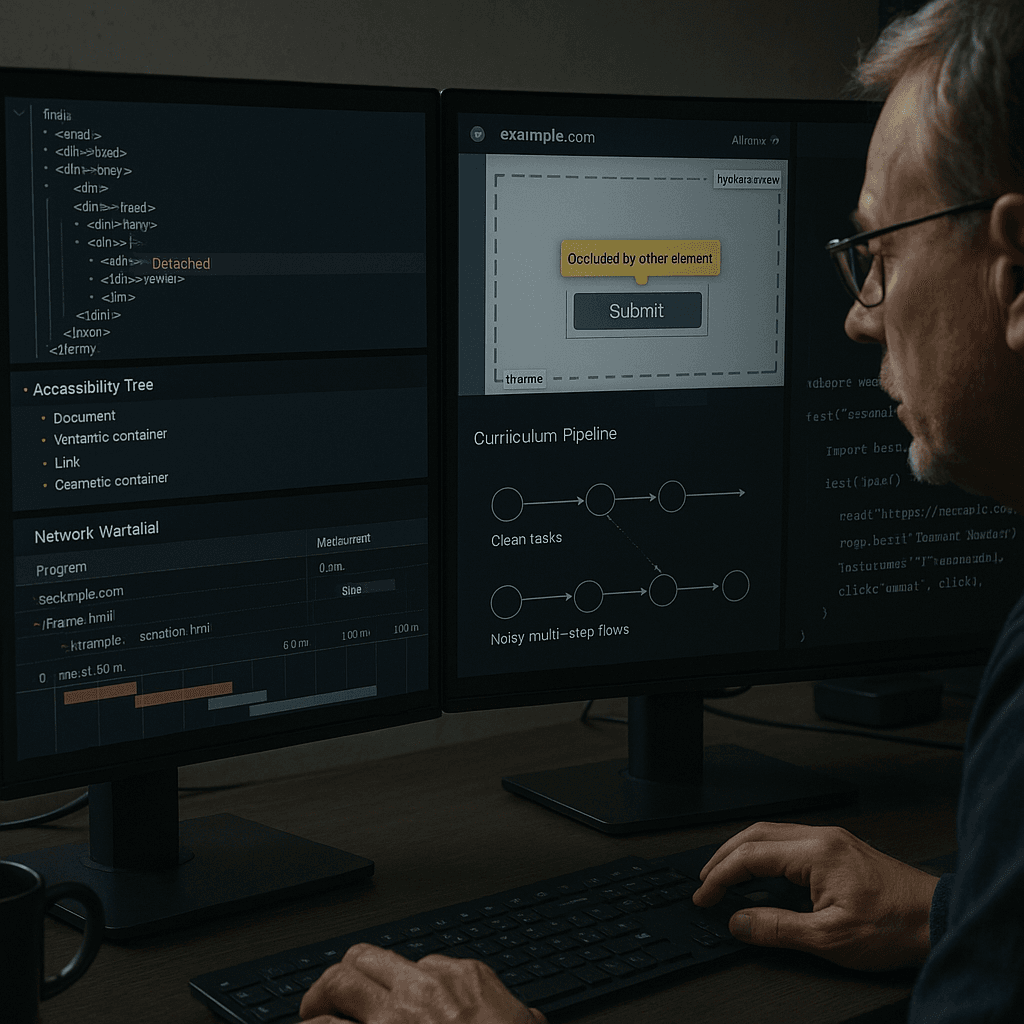
Curriculum Learning for Browser Agents: Mining Repairable Failures from Real DOM Traces to Improve Step Reliability
Most browser agents do not fail because the task is fundamentally impossible. They fail because one step lands on the wrong node, at the wrong time, with the wrong assumptions.
In production, that usually looks boring rather than dramatic:
- a click targets an element that was valid 200 ms ago but has been re-rendered
- a button is “visible” by DOM rules but is covered by a sticky header
- a list item exists in the accessibility tree but is not mounted because the container is virtualized
- the agent finds the right label text, but the underlying node is stale after hydration
- the action succeeds mechanically, but the intended postcondition never happens
If you are building browser agents, generic benchmark success rates are not enough. What matters is step reliability under realistic UI failure modes. The fastest path to improvement is not inventing bigger planning loops. It is mining your own real execution traces, extracting repairable failures, and turning them into supervised training data and runtime recovery policies.
This article is about how to do that in practice.
I’ll focus on an implementation pattern that has worked well in browser automation systems:
- collect step-level traces from real runs
- annotate intent, preconditions, action targets, and postconditions
- classify repairable failure modes
- generate a curriculum from easy clean interactions to noisy multi-step flows
- train or tune a policy that selects actions and repairs
- run a step executor that validates postconditions and invokes targeted recoveries instead of full replans
The theme here is simple: treat failures as data, not just incidents.
A Real Failure: “Click Submit” Works in Replay, Fails in Production
Let’s start with a representative trace.
The task is mundane: sign in, fill a form, click Submit.
The agent produced this action:
json{
  "step_id": 18,
  "intent": "submit form",
  "action": {
    "type": "click",
    "selector_strategy": "text+role",
    "selector": {"role": "button", "name": "Submit"}
  }
}
In local replay, this often works. In CI and headless production, it flakes.
Playwright error:
textTimeoutError: locator.click: Timeout 5000ms exceeded.
Call log:
  - waiting for getByRole('button', { name: 'Submit' })
    - locator resolved to <button class="btn btn-primary">Submit</button>
  - attempting click action
    - waiting for element to be visible, enabled and stable
    - element is visible, enabled and stable
    - scrolling into view if needed
    - done scrolling
    - <div class="toast-container">…</div> intercepts pointer events
  - retrying click action
    - waiting 20ms
    - <div class="toast-container">…</div> intercepts pointer events
  - retrying click action
    - waiting 100ms
    - <header class="sticky">…</header> intercepts pointer events
The screenshot shows a sticky header and a transient toast. The DOM snapshot says the button exists and is visible. The accessibility tree says it is an enabled button named Submit. The node is correct.
But the action still fails.
Root cause
The failure is not target selection. It is interaction invalidation at execution time. The chosen node is semantically correct, yet physically unclickable in the current viewport.
If your agent training data only records successful steps, you never learn this distinction. You teach the model that locating a good node is enough. In real browser environments, it isn’t.
The repair is usually small:
- wait for toast dismissal
- scroll to center rather than nearest edge
- verify clickable point with hit-testing
- retry after layout stabilizes
- if covered by persistent chrome, use keyboard navigation or form submit fallback
This is exactly the kind of failure you should mine and label.
Why Naive Approaches Fail
There are a few common designs that look reasonable in demos and degrade badly in production.
1. One-shot planning with weak execution verification
A lot of agents do this:
- parse page
- ask model for next action
- run action
- continue if no hard exception
That is too weak. Many browser failures are silent semantic failures:
- typing went into the wrong field after focus drift
- click hit an overlay
- select option opened a dropdown but did not commit choice
- route changed but form state did not update
If you do not verify postconditions after every step, you accumulate latent errors until the task is irrecoverable.
2. Full replan on any exception
Another common design: any failed click triggers a full “re-read the page and plan again” loop.
That works for some cases, but it is expensive and often unstable. Many failures are local and repairable:
- detached node after React re-render
- iframe not switched
- virtualized row not mounted
- stale text after async refresh
- hydration race before listeners attach
A full replan can actually make things worse by changing context and introducing new mistakes.
3. Training on synthetic clean trajectories
Synthetic datasets tend to be unrealistically clean:
- static DOM n- no overlays
- no sticky chrome
- no hydration gaps
- no network slowness
- no virtualization
- no nested browsing contexts
Agents trained on these traces learn idealized web interaction, not browser reality.
4. Over-indexing on screenshot-only policies
Vision matters, but screenshot-only control struggles with repair classes that are obvious in DOM/network/accessibility context:
- element detached between candidate selection and action
- text changed because stale server response was reconciled
- button present but aria-disabled=true during pending mutation
- row exists semantically but is not mounted due to virtualization window
- target is inside cross-origin iframe
For robust step execution, you want multi-view state: DOM, AX tree, viewport geometry, and event/network timing.
The Architecture: Failure Mining as a Training and Runtime Primitive
The system I recommend has two loops sharing the same trace format.
Offline loop
- instrument browser runs
- collect rich step traces
- detect and cluster failures
- label repairable examples
- produce curriculum datasets
- train models or heuristics for candidate scoring and recovery policy selection
- evaluate offline against failure-heavy trace sets
Online runtime loop
- incrementally parse current page state
- select candidate elements using structural + semantic features
- execute action with guardrails
- verify postconditions
- if failure is repairable, invoke targeted recovery
- only escalate to replan when local recovery budget is exhausted
The key is that both loops speak the same language: step intent, preconditions, target candidates, action attempt, observed outcome, failure class, repair.
What to Collect in a Step-Level Trace
A useful trace is not just “before screenshot” and “after screenshot.” It needs enough context to replay selection and diagnose why the step failed.
For each step, capture:
- task metadata
- page/frame URL and origin
- DOM snapshot around candidate targets
- accessibility tree slice
- viewport geometry and scroll offsets
- screenshots with bounding boxes
- network activity and pending requests
- console logs and page errors
- action intent and natural-language instruction
- candidate element set and ranking features
- action execution logs
- postcondition checks and outcome
A practical schema might look like this:
json{
  "trace_id": "run_2026_03_18_114233",
  "step_id": 18,
  "timestamp": 1710764551.123,
  "task": {
    "goal": "Submit reimbursement form",
    "current_subgoal": "Click submit button"
  },
  "page": {
    "url": "https://app.example.com/expense/new",
    "title": "New Expense",
    "viewport": {"width": 1440, "height": 900, "scrollX": 0, "scrollY": 1180},
    "main_frame_id": "frame_main",
    "active_frame_id": "frame_main"
  },
  "dom": {
    "snapshot_ref": "dom_step18.bin",
    "candidate_node_ids": [4412, 8831, 5520]
  },
  "ax": {
    "snapshot_ref": "ax_step18.json",
    "candidate_ax_ids": [912, 1440]
  },
  "visual": {
    "screenshot_ref": "step18.png",
    "candidate_boxes": [
      {"node_id": 4412, "x": 991, "y": 732, "w": 128, "h": 36}
    ]
  },
  "network": {
    "inflight_requests": 2,
    "recent": [
      {"url": "/api/toasts", "status": 200, "ts": 1710764550.992},
      {"url": "/api/form/validate", "status": 202, "ts": 1710764551.011}
    ]
  },
  "intent": {
    "action_type": "click",
    "semantic_target": "submit form",
    "constraints": ["must submit current expense form"]
  },
  "selection": {
    "strategy": "candidate_ranker_v4",
    "top_candidates": [
      {
        "node_id": 4412,
        "score": 0.91,
        "features": {
          "role": "button",
          "name": "Submit",
          "text_similarity": 0.98,
          "clickable": true,
          "centerpoint_visible": false,
          "z_intersection_risk": 0.73
        }
      }
    ]
  },
  "execution": {
    "attempt": 1,
    "playwright_call": "getByRole('button', { name: 'Submit' }).click()",
    "error": "pointer_intercepted"
  },
  "postcondition": {
    "expected": ["route changes or success toast appears or form enters submitted state"],
    "observed": []
  }
}
This looks heavyweight, and it is. But you do not need to store full-fidelity blobs forever. Later I’ll cover compression and retention.
Instrumenting Playwright to Capture the Right State
Below is a Python-oriented trace collector using Playwright. The point is not that this exact code is enough, but that your runtime should record browser-native evidence, not just model prompts.
pythonimport asyncio
import json
import time
from pathlib import Path
from typing import Any, Dict, List
from playwright.async_api import async_playwright, Page, Frame, Error as PlaywrightError

TRACE_DIR = Path("./traces")
TRACE_DIR.mkdir(exist_ok=True)

JS_DOM_SNAPSHOT = r'''
() => {
  function nodeToObj(node, depth = 0) {
    if (!node || depth > 5) return null;
    const rect = node.getBoundingClientRect ? node.getBoundingClientRect() : null;
    const style = window.getComputedStyle ? getComputedStyle(node) : null;
    return {
      tag: node.tagName || null,
      id: node.id || null,
      classes: node.className || null,
      text: (node.innerText || node.textContent || '').slice(0, 500),
      role: node.getAttribute ? node.getAttribute('role') : null,
      name: node.getAttribute ? (node.getAttribute('aria-label') || node.getAttribute('name')) : null,
      disabled: node.disabled || (node.getAttribute && node.getAttribute('aria-disabled') === 'true') || false,
      href: node.href || null,
      rect: rect ? {x: rect.x, y: rect.y, width: rect.width, height: rect.height} : null,
      visible: !!(rect && rect.width > 0 && rect.height > 0),
      pointerEvents: style ? style.pointerEvents : null,
      zIndex: style ? style.zIndex : null,
      children: Array.from(node.children || []).slice(0, 20).map(c => nodeToObj(c, depth + 1))
    };
  }

  const root = document.body;
  return {
    url: location.href,
    title: document.title,
    viewport: {
      width: window.innerWidth,
      height: window.innerHeight,
      scrollX: window.scrollX,
      scrollY: window.scrollY
    },
    activeElement: document.activeElement ? {
      tag: document.activeElement.tagName,
      id: document.activeElement.id,
      text: (document.activeElement.innerText || '').slice(0, 200)
    } : null,
    body: nodeToObj(root)
  };
}
'''

JS_HIT_TEST = r'''
(el) => {
  const rect = el.getBoundingClientRect();
  const cx = rect.left + rect.width / 2;
  const cy = rect.top + rect.height / 2;
  const topEl = document.elementFromPoint(cx, cy);
  return {
    rect: {x: rect.x, y: rect.y, width: rect.width, height: rect.height},
    center: {x: cx, y: cy},
    topTag: topEl ? topEl.tagName : null,
    topId: topEl ? topEl.id : null,
    topClass: topEl ? topEl.className : null,
    isTargetOrDescendant: topEl ? (topEl === el || el.contains(topEl)) : false
  };
}
'''

class StepTracer:
    def __init__(self, run_id: str):
        self.run_id = run_id
        self.events: List[Dict[str, Any]] = []

    async def snapshot_page(self, page: Page, step_id: int) -> Dict[str, Any]:
        ts = time.time()
        dom = await page.evaluate(JS_DOM_SNAPSHOT)
        screenshot_path = TRACE_DIR / f"{self.run_id}_step{step_id}.png"
        await page.screenshot(path=str(screenshot_path), full_page=False)

        event = {
            "run_id": self.run_id,
            "step_id": step_id,
            "ts": ts,
            "page": dom,
            "screenshot": str(screenshot_path)
        }
        self.events.append(event)
        return event

    def write(self):
        out = TRACE_DIR / f"{self.run_id}.json"
        out.write_text(json.dumps(self.events, indent=2))

async def robust_click(page: Page, locator, tracer: StepTracer, step_id: int):
    await tracer.snapshot_page(page, step_id)
    try:
        await locator.scroll_into_view_if_needed()
        await locator.click(timeout=5000)
        return {"ok": True}
    except PlaywrightError as e:
        return {"ok": False, "error": str(e)}

async def main():
    async with async_playwright() as pw:
        browser = await pw.chromium.launch(headless=True)
        page = await browser.new_page(viewport={"width": 1440, "height": 900})
        tracer = StepTracer(run_id="demo_run")
        await page.goto("https://example.com")
        result = await robust_click(page, page.get_by_role("button", name="Submit"), tracer, 1)
        print(result)
        tracer.write()
        await browser.close()

if __name__ == "__main__":
    asyncio.run(main())
For real systems, extend this to:
- capture frame tree and per-frame snapshots
- log request/response metadata
- hook console/pageerror
- capture accessibility tree where possible
- record action retries and candidate selection metadata
- save DOM deltas rather than full DOM each step
JavaScript network and error hooks
javascriptconst trace = { requests: [], console: [], pageErrors: [] };

page.on('request', req => {
  trace.requests.push({
    t: Date.now(),
    kind: 'request',
    url: req.url(),
    method: req.method(),
    resourceType: req.resourceType()
  });
});

page.on('response', async res => {
  trace.requests.push({
    t: Date.now(),
    kind: 'response',
    url: res.url(),
    status: res.status()
  });
});

page.on('console', msg => {
  trace.console.push({
    t: Date.now(),
    type: msg.type(),
    text: msg.text()
  });
});

page.on('pageerror', err => {
  trace.pageErrors.push({
    t: Date.now(),
    message: err.message,
    stack: err.stack
  });
});
These hooks matter because many “DOM failures” are really timing failures visible in network and console events.
Labeling Action Intents and Preconditions
A repair dataset is much more useful if it represents what the step was trying to achieve, not only what method was called.
For each step, label at least:
- intent: click primary submit, open menu, choose list item, focus field, enter text, confirm modal, switch tab
- target semantics: submit form, search products, choose shipping option
- preconditions: visible, attached, enabled, in correct frame, focusable, text stable, option mounted
- postconditions: route changed, modal closed, field value set, list expanded, toast appeared, DOM state updated
This is the bridge between brittle selector-level replay and a generalizable policy.
Example labeled step:
json{
  "intent": "select_option",
  "target_semantics": "choose 'United States' in billing country dropdown",
  "preconditions": [
    "country combobox exists",
    "combobox expanded or expandable",
    "option text available or searchable",
    "target frame active"
  ],
  "postconditions": [
    "combobox value == 'United States'",
    "country-dependent fields revalidated"
  ]
}
You can bootstrap these labels from heuristics plus reviewer tooling:
- infer action type from automation call
- infer semantic target from nearby text, form labels, ARIA name, instruction span, and task metadata
- infer preconditions from target properties and action contracts
- infer postconditions from expected state transitions by action type
The goal is not perfect ontology purity. The goal is making failures repairable and learnable.
Failure Taxonomy That Actually Helps Runtime Recovery
A good failure taxonomy should map to distinct recovery behavior. Here are the classes worth tracking.
1. Detached node
Symptoms
- Playwright: element is not attached to the DOM
- action target existed during ranking, disappeared during execution
- often after React/Vue rerender, optimistic update, route transition
Recovery
- re-resolve candidate from stable anchors
- avoid stale handles; store selector features and semantic signature
- retry within same local context before replan
2. Occlusion / pointer interception
Symptoms
- intercepting element in call log
- elementFromPoint at center is not target
- sticky headers, toasts, cookie banners, modals, loading masks
Recovery
- center-scroll or offset-scroll
- wait for transient overlay disappearance
- dismiss known overlays
- keyboard submit or Enter if semantically equivalent
3. Hydration race / listeners not attached yet
Symptoms
- button visible and enabled but first click does nothing
- network and console show bundle load or hydration completion near failure
- repeated click after short delay succeeds
Recovery
- wait for app idle heuristic, not just DOM loaded
- require text and layout stability over a short window
- retry with postcondition verification
4. Stale text / semantic drift
Symptoms
- matching text is present but no longer refers to intended object
- list order changed, labels updated, server-rendered placeholder replaced
- agent clicks old “Edit” for wrong row
Recovery
- rank by structural anchors, not only text
- include nearby key-value context and ancestry features
- verify object identity after action
5. Virtualized content
Symptoms
- target row known from data/task but not mounted in DOM
- AX tree may expose partial semantics, DOM query misses target
- scrolling changes DOM membership
Recovery
- detect virtual scrollers
- scroll/search progressively
- use list container semantics and row index/data attributes
- verify mount before action
6. Iframe boundary issues
Symptoms
- target not found in main frame but visible on screen
- clicks appear to hit frame element, not internal target
- cross-origin constraints block direct DOM traversal
Recovery
- identify frame ownership during candidate selection
- switch frame context explicitly
- use frame-local selectors and screenshots
- maintain frame tree in trace and candidate features
7. Disabled/pending state
Symptoms
- aria-disabled, disabled attribute, loading spinners, submit button gated by validation
- action mechanically possible via force click but semantically invalid
Recovery
- do not force click as default
- satisfy missing prerequisites
- inspect validation errors and required fields
8. Focus drift / keyboard target mismatch
Symptoms
- typed text appears nowhere or in wrong input
- modal steals focus
- async validation shifts focus
Recovery
- verify active element before typing
- prefer direct fill on intended control
- re-focus and re-check value postcondition
The point of this taxonomy is that each class leads to a targeted repair policy. That is what makes local recovery work.
Building Curriculum Stages from Failure-Mined Data
Curriculum learning is often discussed abstractly. For browser agents, it should be concrete and operational.
You already have trace data. Use it to define stages that increase difficulty along the dimensions your runtime actually struggles with.
Stage 0: Clean single-step interactions
Examples:
- click clearly labeled visible button
- fill obvious text input
- select dropdown option already mounted
Characteristics:
- static DOM
- no overlays
- single frame
- no virtualized lists
- immediate postcondition
Purpose:
- train base candidate selection and postcondition checking
Stage 1: Clean actions with distractors
Examples:
- multiple buttons named “Save”
- multiple inputs with similar labels
- repeated rows and actions in tables
Characteristics:
- target requires structural grounding
- nearest text is insufficient
Purpose:
- train semantic + structural ranking
Stage 2: Timing noise and transient invalidation
Examples:
- hydration races
- delayed enabling
- spinners and toasts
- route transitions
Purpose:
- train anti-flake timing and local retries
Stage 3: DOM churn and stale targets
Examples:
- detached nodes after render
- list reorder after filter
- text replaced after async load
Purpose:
- train semantic re-resolution from stable anchors
Stage 4: Viewport and occlusion complexity
Examples:
- sticky headers/footers
- responsive layout changes
- offscreen targets
- nested scroll containers
Purpose:
- train geometry-aware execution and hit-test verification
Stage 5: Virtualization and search-in-list behavior
Examples:
- lazy rows
- infinite scroll tables
- combobox options mounted on demand
Purpose:
- train scroll/search/mount loops
Stage 6: Iframes and multi-context flows
Examples:
- embedded payment forms
- auth widgets
- editor inside iframe
Purpose:
- train frame-aware targeting and action routing
Stage 7: Multi-step flows with compounding local failures
Examples:
- checkout
- enterprise admin forms
- dashboards with tabbed workflows
Purpose:
- train bounded local recovery without full task collapse
The key is not just ordering from easy to hard. It is preserving the repair labels so the learner sees both failure state and successful recovery action.
Mining Repairable Failures from Real Traces
You need a pipeline that converts raw runs into supervised examples.
Step 1: Segment runs into attempts
For each action step:
- identify intended target and action
- collect all retries within a local time window
- attach browser logs, DOM delta, and postcondition observations
Step 2: Determine whether the failure was repairable
A failure is repairable if a local change within the same subgoal later succeeded, for example:
- re-query same semantic target and click succeeded
- same input after refocus succeeded
- switched frame and target became interactable
- scrolled virtualized container until row mounted, then clicked succeeded
Step 3: Extract failure → repair pairs
Example:
json{
  "failure_state": {
    "intent": "click submit",
    "failure_class": "occlusion",
    "evidence": {
      "interceptor": "div.toast-container",
      "centerpoint_visible": false,
      "target_role": "button",
      "target_name": "Submit"
    }
  },
  "repair_action": {
    "policy": "wait_overlay_then_center_scroll_then_retry",
    "args": {"max_wait_ms": 1500}
  },
  "outcome": "success"
}
Step 4: Cluster near-duplicates
You do not want a dataset dominated by one app’s same toast overlay repeated 20,000 times.
Cluster on:
- failure class
- DOM ancestry signature
- app/page template
- action type
- target role/name
- repair policy
Then sample for diversity.
Step 5: Build train/validation/test splits by site and template
Avoid leakage. If the same page template appears in train and test, your offline metrics are inflated.
Prefer splits by:
- domain/app
- page family/template hash
- workflow type
This matters more than benchmark ideology. You want evidence the system generalizes to new UI instances, not just repeated pages.
Incremental DOM Parsing at Runtime
A runtime should not rebuild full world state from scratch on every tiny step if the page only changed locally.
Use an incremental parser with invalidation boundaries.
Track:
- frame tree
- node ids and ancestry
- role/name/text summaries
- bounding boxes
- scroll containers
- mutation timestamps
- stable signatures for candidate re-resolution
A useful stable signature includes:
- role
- accessible name
- normalized text
- ancestor chain of landmarks/forms/sections
- sibling labels and nearby headings
- data-* attributes when present
- frame path
Python sketch for candidate extraction
pythonfrom dataclasses import dataclass
from typing import List, Optional
import re

@dataclass
class Candidate:
    node_id: str
    frame_id: str
    tag: str
    role: Optional[str]
    name: str
    text: str
    bbox: dict
    enabled: bool
    visible: bool
    ancestors: List[str]
    score: float = 0.0


def normalize(s: str) -> str:
    return re.sub(r'\s+', ' ', (s or '').strip().lower())


def score_candidate(intent: str, c: Candidate) -> float:
    score = 0.0
    target = normalize(intent)
    name = normalize(c.name)
    text = normalize(c.text)

    if 'submit' in target and (name == 'submit' or text == 'submit'):
        score += 0.5
    if c.role == 'button' or c.tag == 'BUTTON':
        score += 0.2
    if c.visible:
        score += 0.1
    if c.enabled:
        score += 0.1
    if any(a in ('FORM', 'MAIN', 'SECTION') for a in c.ancestors):
        score += 0.05
    if c.bbox and c.bbox.get('width', 0) > 20 and c.bbox.get('height', 0) > 20:
        score += 0.05
    return score


def rank_candidates(intent: str, candidates: List[Candidate]) -> List[Candidate]:
    for c in candidates:
        c.score = score_candidate(intent, c)
    return sorted(candidates, key=lambda x: x.score, reverse=True)
In production, the score should use more than string matching:
- lexical similarity to task and current subgoal
- role-action compatibility
- geometry features
- ancestry landmarks
- label/control association
- historical success rates for pattern families
- hit-test validity
- frame confidence
- mutation recency penalty
The model can be learned, but the runtime still needs deterministic guardrails.
Verifying Postconditions After Every Action
This is where many agents become reliable or stay flaky.
An action is not successful because Playwright didn’t throw. It is successful because the expected state transition happened.
Postconditions should be specific by action type.
Click examples
- modal opened or closed
- route changed
- accordion expanded
- submit triggered network request and form entered pending/submitted state
Fill examples
- input value equals expected normalized string
- dependent validation state updated
- masked input matches canonical value
Select examples
- selected option text/value updated on control
- dependent region rerendered
A runtime loop:
pythonasync def execute_step_with_verification(step, page, selector_engine, recoveries):
    candidates = await selector_engine.find_candidates(page, step.intent)
    target = candidates[0] if candidates else None
    if not target:
        return {"status": "failed", "reason": "no_candidate"}

    result = await perform_action(page, step, target)
    if result["status"] == "ok":
        ok = await verify_postcondition(page, step.postconditions)
        if ok:
            return {"status": "ok", "used_recovery": False}
        result = {"status": "failed", "reason": "postcondition_not_met"}

    failure_class = await classify_failure(page, step, target, result)
    repair = recoveries.choose(failure_class, step, target)
    if not repair:
        return {"status": "failed", "reason": failure_class}

    repaired = await repair.apply(page, step, target)
    if repaired:
        ok = await verify_postcondition(page, step.postconditions)
        if ok:
            return {"status": "ok", "used_recovery": True, "recovery": failure_class}

    return {"status": "failed", "reason": failure_class}
This is the core execution discipline: act, verify, recover locally, verify again, then escalate.
Targeted Recovery Policies Instead of Full Replans
A repair policy should be scoped, cheap, and evidence-driven.
Example recovery table
pythonRECOVERY_TABLE = {
    "detached_node": [
        "requery_by_semantic_signature",
        "retry_click"
    ],
    "occlusion": [
        "wait_transient_overlay",
        "scroll_center",
        "hit_test_then_click"
    ],
    "hydration_race": [
        "wait_ui_stable_window",
        "retry_click_with_postcondition_check"
    ],
    "virtualized_content": [
        "identify_scroll_container",
        "progressive_scroll_search",
        "requery_target"
    ],
    "iframe_boundary": [
        "switch_frame_context",
        "requery_in_frame"
    ]
}
JavaScript example: hit-test before click
javascriptasync function clickWithHitTest(locator) {
  const handle = await locator.elementHandle();
  if (!handle) throw new Error('missing element handle');

  const hit = await handle.evaluate((el) => {
    const r = el.getBoundingClientRect();
    const x = r.left + r.width / 2;
    const y = r.top + r.height / 2;
    const top = document.elementFromPoint(x, y);
    return {
      width: r.width,
      height: r.height,
      x,
      y,
      ok: !!top && (top === el || el.contains(top)),
      topTag: top?.tagName,
      topClass: top?.className || null,
      topId: top?.id || null,
    };
  });

  if (!hit.ok) {
    await locator.scrollIntoViewIfNeeded();
    await locator.evaluate((el) => {
      el.scrollIntoView({ block: 'center', inline: 'center', behavior: 'instant' });
    });
  }

  await locator.click({ timeout: 3000 });
}
Example: virtualized list recovery
pythonasync def find_in_virtualized_list(container_locator, text, max_scrolls=20):
    for i in range(max_scrolls):
        item = container_locator.get_by_text(text, exact=True)
        if await item.count() > 0:
            return item.first
        await container_locator.evaluate("el => { el.scrollTop += el.clientHeight * 0.8; }")
        await asyncio.sleep(0.15)
    return None
Example: iframe-aware targeting
pythonasync def find_button_any_frame(page, name: str):
    for frame in page.frames:
        locator = frame.get_by_role("button", name=name)
        try:
            if await locator.count() > 0:
                return frame, locator.first
        except Exception:
            pass
    return None, None
These policies are not glamorous, but they are exactly what turns step reliability into something you can measure and improve.
Headless Environments and Anti-Flake Timing
Headless is not just headed without pixels. You will see meaningful differences:
- font/render timing differences
- viewport defaults and responsive breakpoints
- animation timing interactions
- focus behavior under CI load
- slower JS execution under shared runners
A few practical rules help a lot.
1. Use deterministic viewport and user agent
Do not let browser defaults drift across environments.
pythonpage = await browser.new_page(
    viewport={"width": 1440, "height": 900},
    user_agent="Mozilla/5.0 ... browser-agent-runtime/1.0"
)
2. Prefer stability windows over arbitrary sleeps
Avoid sleep(2) after every action. Instead wait for a short interval where critical signals stay unchanged:
- no DOM mutations in target subtree
- layout box stable
- no overlay at hit point
- no pending app-critical request class
Stability probe injected into page
javascript() => {
  if (window.__agentStableProbeInstalled) return true;
  window.__agentStableProbeInstalled = true;
  window.__agentMutations = 0;
  const obs = new MutationObserver(() => window.__agentMutations++);
  obs.observe(document.documentElement, { childList: true, subtree: true, attributes: true });
  return true;
}
Then poll mutation count over a short window rather than sleeping blindly.
3. Disable or reduce known flaky animations when possible
For internal apps or controlled test environments, inject CSS:
javascriptawait page.add_style_tag({
  content: `
    *, *::before, *::after {
      transition-duration: 0s !important;
      animation-duration: 0s !important;
      scroll-behavior: auto !important;
    }
  `
});
Do this carefully; some apps rely on transitions for state timing. But for many enterprise UIs, this reduces false flake.
4. Never default to force click
force=True is useful for diagnostics, not as a primary recovery. It bypasses exactly the evidence you need to know whether the action was semantically valid.
Trace Compression and Storage Strategy
Raw traces get large quickly. If you are collecting step-level DOM, screenshots, AX, and network logs, cost becomes real.
A practical strategy:
Keep full fidelity for:
- failed steps
- repaired steps
- a sampled subset of successful steps
- first occurrence of a page/template/version
Store compressed representations for everything else:
- DOM delta against previous step
- subtree around target and top-k candidates only
- screenshot crops plus page-level thumbnail
- network summaries instead of bodies
- hashed template signatures
Useful compression techniques:
- deduplicate repeated DOM subtrees by content hash
- store text separately from structure
- keep normalized accessibility nodes rather than full protocol dumps
- persist selector features instead of all raw attributes
You want enough evidence to train and debug, not a forensic archive of every pixel forever.
Offline Evaluation That Reflects Production Reality
Do not rely on broad benchmark averages as your primary signal. Build an offline suite from your failure-mined traces.
Evaluate at three levels.
1. Candidate selection quality
Given trace state and intent:
- is the intended target in top-k?
- rank position of correct target
- failure-class-specific recall
2. Step execution quality
Given target and page state:
- postcondition success rate
- retries per successful step
- false success rate where no exception occurred but postcondition failed
- mean time to recover
3. Recovery quality
Condition on repairable failures:
- repair success by failure class
- repair latency
- unnecessary full replan rate
- degradation when multiple failure types co-occur
A good dashboard slices by:
- app/template
- action type
- failure class
- headed vs headless
- browser version
- network condition profile
That gives you a real engineering loop. You can answer questions like:
- Did the new ranker improve stale-text rows but hurt iframe targeting?
- Did anti-occlusion logic reduce pointer interception without increasing latency too much?
- Are hydration race recoveries helping only on React pages and not server-rendered flows?
Using Failure-Mined Data to Improve Robustness
There are several ways to use the dataset, depending on your stack.
1. Train a candidate ranker
Input features:
- instruction embedding / lexical features
- role/name/text features
- ancestry and landmark features
- geometry and visibility features
- mutation recency
- frame identity
- hit-test and occlusion risk
Label:
- clicked-and-verified target is positive
- confusable candidates are hard negatives
This alone improves a lot of step reliability.
2. Train a failure classifier
Input:
- execution error text
- DOM features of target
- recent network/console state
- viewport geometry
- postcondition observation
Output:
- detached_node
- occlusion
- hydration_race
- stale_text
- virtualized_content
- iframe_boundary
- disabled_pending
- focus_drift
A decent classifier lets you choose recovery policies much more effectively than generic retry loops.
3. Fine-tune a repair policy selector
Input:
- failure state
- top candidate metadata
- browser logs
- prior retries
Output:
- wait_and_retry
- requery_same_signature
- switch_frame
- progressive_scroll_search
- dismiss_overlay
- escalate_to_replan
This can be a learned policy or a rules-first policy with learned ranking.
4. Improve prompts if you are using an LLM in the loop
Failure-mined examples are excellent few-shot material because they encode:
- local context
- failure evidence
- minimal repair
- successful outcome
That is far more useful than generic benchmark tasks because it matches your runtime, your sites, and your observed failure modes.
A Production-Oriented Step Executor
Here is a more complete sketch of how the runtime can be structured.
pythonclass StepExecutor:
    def __init__(self, selector_engine, verifier, classifier, recovery_manager, tracer):
        self.selector_engine = selector_engine
        self.verifier = verifier
        self.classifier = classifier
        self.recovery_manager = recovery_manager
        self.tracer = tracer

    async def run_step(self, page, step, max_local_repairs=2):
        await self.tracer.record_pre_state(page, step)

        candidates = await self.selector_engine.find_candidates(page, step)
        if not candidates:
            return await self._fail(page, step, "no_candidate")

        target = candidates[0]
        action_result = await self._perform(page, step, target)
        verified = await self.verifier.check(page, step)

        if action_result["ok"] and verified:
            await self.tracer.record_success(page, step, target, candidates)
            return {"status": "ok", "repairs": 0}

        repairs = 0
        last_reason = None
        while repairs < max_local_repairs:
            failure = await self.classifier.classify(page, step, target, action_result, verified)
            last_reason = failure
            await self.tracer.record_failure(page, step, target, failure)

            policy = self.recovery_manager.choose(failure, step, target, candidates)
            if not policy:
                break

            changed = await policy.apply(page, step, target)
            repairs += 1
            if not changed:
                break

            candidates = await self.selector_engine.find_candidates(page, step)
            if not candidates:
                break
            target = candidates[0]

            action_result = await self._perform(page, step, target)
            verified = await self.verifier.check(page, step)
            if action_result["ok"] and verified:
                await self.tracer.record_recovery_success(page, step, target, failure, policy.name)
                return {"status": "ok", "repairs": repairs, "recovery": policy.name}

        return await self._fail(page, step, last_reason or "unknown_failure")

    async def _perform(self, page, step, target):
        try:
            if step["action_type"] == "click":
                await target.locator.click(timeout=3000)
            elif step["action_type"] == "fill":
                await target.locator.fill(step["value"], timeout=3000)
            else:
                raise ValueError(f"unsupported action {step['action_type']}")
            return {"ok": True}
        except Exception as e:
            return {"ok": False, "error": str(e)}

    async def _fail(self, page, step, reason):
        await self.tracer.record_terminal_failure(page, step, reason)
        return {"status": "failed", "reason": reason}
This is intentionally conservative. It keeps repairs local and bounded. That tends to outperform broad replanning in noisy production UIs.
Practical Lessons from Real Systems
A few lessons are worth stating plainly.
1. Most improvements come from boring data hygiene
Richer traces, correct postconditions, and honest failure labels usually help more than swapping model architectures.
2. Repairability is the right unit of learning
Not every failure deserves a local fix. But many do. If you can identify the repairable subset well, both runtime stability and training signal improve.
3. Structural context beats raw text in repeated UIs
Tables, settings forms, dashboards, and admin apps are full of repeated labels. Learn and store ancestry, landmarks, and sibling context.
4. Browser-native evidence matters
Playwright call logs, frame trees, hit-tests, and network timing are not incidental debugging artifacts. They are core features for reliability.
5. Silent failures are more dangerous than thrown exceptions
A click that throws is easy to detect. A click that “worked” but changed nothing is what corrupts long workflows.
6. Full replans should be a last resort
If every failure restarts planning, your system becomes expensive, inconsistent, and hard to debug.
Takeaways
If you want browser agents that survive real websites, stop treating failures as noise around success metrics. Failures are the dataset.
The practical recipe is:
- Collect step-level traces with DOM, accessibility, viewport, screenshots, frame tree, network, and execution logs.
- Label intent, preconditions, and postconditions so examples reflect task semantics rather than only selectors.
- Classify failures into repairable modes like detached nodes, occlusion, hydration races, stale text, virtualization, and iframe boundary issues.
- Mine failure → repair pairs from real runs and build a curriculum from clean single-step interactions to noisy multi-step workflows.
- Parse DOM incrementally at runtime, rank candidates with structural and semantic features, and verify postconditions after every action.
- Invoke targeted recovery policies before escalating to full replans.
- Evaluate offline on your own failure-heavy traces, not just generic agent benchmarks.
That approach does not make browser automation easy. But it does make it engineerable.
And that is the real shift: from hoping a general agent figures out the web, to building a browser agent system that learns from its own real, repairable mistakes.