
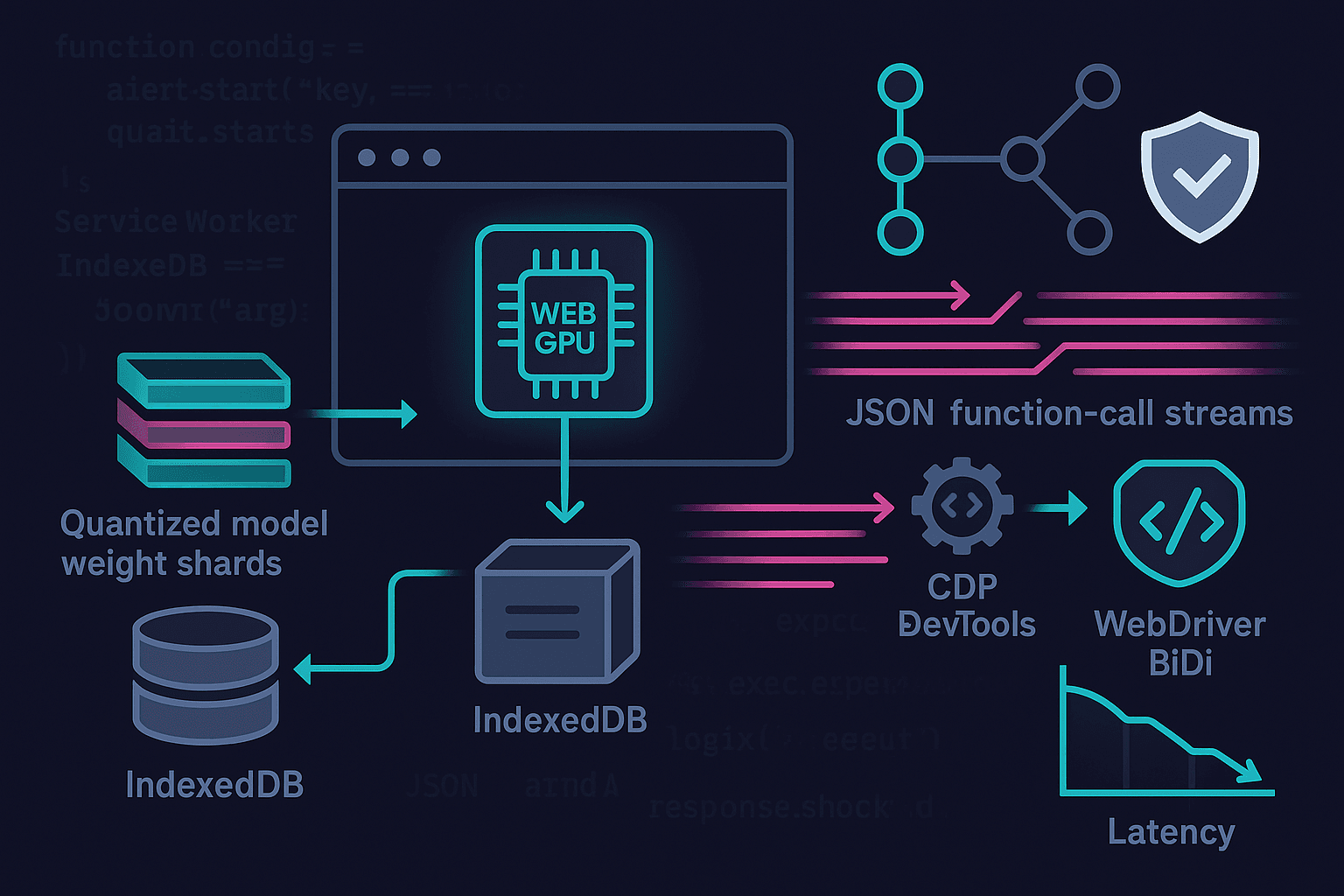
TL;DR
- You can run a capable agent planner fully in the browser today with WebGPU and WASM, keeping data private and latencies low.
- Use a compact, quantized controller model (1–3B params ideally; 7–8B on high‑end GPUs) and stream tokens while you stream tool calls over CDP/BiDi.
- Shard and cache weight files with HTTP range requests + Service Worker + IndexedDB; cap KV cache and quantize it to survive memory limits.
- Favor structured decoding for tool calls, incremental JSON parsing, and backpressure-aware pipelines.
- Ship a progressive experience: feature-detect WebGPU; fall back to WASM threads+SIMD; distill/quantize aggressively; and keep everything on-device for privacy.
Introduction: Why Browser‑Native Agents
Agents don’t have to live in a datacenter. With WebGPU, WASM SIMD/threads, and maturing JS/TS runtimes for ML, we can run LLM-based planners entirely in the browser. That buys us three things:
- Privacy: user data and page context don’t leave the device. For consumer and enterprise, this is a decisive advantage.
- Latency: no WAN round trips; planning loops shrink to tens of milliseconds per turn on capable hardware.
- Cost/control: zero server inference costs; distribute once; cache locally.
The conventional picture—server LLM + remote tools—can be inverted. The agent planner and its tool drivers run on-device, while “tools” are just browser automation channels (Chrome DevTools Protocol and WebDriver BiDi), DOM access, local vector search, and OS-adjacent APIs exposed through extensions or local bridges. The result is a responsive, privacy-preserving experience with predictable performance that scales with user hardware.
This article lays out an opinionated, end-to-end approach to building “edge LLM browser agents” in practice.
- The model: how to choose/quantize for WebGPU/WASM, memory math, KV cache strategies.
- The pipeline: streaming decoding with streaming tool calls (CDP/BiDi), structured function-calling, safe parsing, and backpressure.
- The platform: caching/sharding weights, Service Worker orchestration, IndexedDB storage, and graceful fallbacks.
- The product: privacy-first defaults, deploy patterns, and what to ship on day one.
Architecture Overview
A pragmatic on-device agent stack decomposes like this:
- Planner LLM: compact controller model running in WebGPU, with JSON-structured function-calling.
- Embedding + local RAG (optional): small embedder (WebGPU or WASM) + HNSW/IVF vector index in IndexedDB for page/app context.
- Tool layer: streaming connectors for CDP (Chrome DevTools Protocol) and WebDriver BiDi; extension-only for privileged operations; plus plain DOM tools.
- Orchestrator: manages token/event streams, backpressure, KV cache, and policy.
- Storage: Service Worker + Cache Storage + IndexedDB for weight shards, compiled kernels, prompts, and vector data.
Plan-Act-Reflect typically outperforms monolithic ReAct when tools are nontrivial and the agent must be cautious. Keep the planner small but smart, enforce structure, and give it page-aware tools.
Choosing and Quantizing the Model
Opinionated pick: target 1–3B parameter planners for mainstream laptops and desktops, and keep 7–8B as an optional high-end path. Distill into that size if needed; don’t try to wedge a raw 13B into the browser. You’ll win more users by being memory-responsible and snappy.
Viable planner backbones today:
- Qwen2.5 1.5B/3B Instruct: strong reasoning in small footprints.
- Phi-3 (mini/small): compact, surprisingly capable.
- Mistral 7B Instruct (edge case): only for WebGPU-capable discrete GPUs.
- Llama 3.2 1B/3B Instruct or SmolLM2: good for tight memory.
Quantization modes for browsers:
- Weight-only quantization: W4A16 or W8A16 is the sweet spot for WebGPU. Per-channel groupwise (e.g., AWQ) beats naive per-tensor.
- KV cache quantization: Q8 or Q4 for keys/values; fp16 acts >2× bigger than Q4 and often isn’t needed for a planner.
- SmoothQuant/post-training quant: stabilize activations; maintain accuracy with small models.
Approximate memory math:
- Parameters: N params × bits/param. Example: 3B @ 4-bit → 3e9 × 0.5 bytes ≈ 1.5 GB weights (plus some metadata/packing overhead ~5–10%).
- KV cache: 2 × hidden_size × num_layers × seq_len × bytes/elt. For 3B with hidden ~3k, layers ~30, seq=2k, Q4 → still hundreds of MB; cap aggressively.
- Activations/temp buffers: 10–25% of weights, depending on kernels.
Rule of thumb: ship 3B W4 for mainstream GPUs; keep a 1B path for integrated GPUs and WASM fallback; expose a switch for 7–8B on high-end.
WebGPU vs WASM Fallbacks
- WebGPU: preferred. Supports fp16, subgroup ops, fast attention kernels. Detect and gate features:
- navigator.gpu and adapter.features (shader-f16, subgroups)
- device.limits.maxStorageBufferBindingSize and maxBufferSize to size shards.
- WASM+SIMD+threads: good fallback via llama.cpp.wasm or ONNX Runtime Web with wasm-threaded backends. Requires cross-origin isolation (COOP/COEP) to enable SharedArrayBuffer and threads; also prefer Memory64 for large heaps.
Streaming Tool Use: CDP/BiDi as First‑Class Functions
Your agent should not “batch-think” for 500 tokens before deciding to click a button. It should stream partial intent as soon as it’s confident and reconcile new evidence as DOM state changes. That implies:
- Token streaming from the LLM.
- Incremental function-call emission with JSON-structured arguments.
- Tool I/O that streams results back to the planner mid-thought.
Patterns that work:
- JSON grammar-constrained decoding for tool invocations.
- A dual-stream: text tokens for rationale + a structured tool stream for actions.
- Optimistic tool execution guarded by a policy layer (e.g., whitelists, least-privilege targets, UI confirmations).
Important browser reality: pages cannot open CDP ports due to SOP and TCP restrictions. Use a browser extension or companion app for privileged automation.
- Chrome extension path: use chrome.debugger or chrome.devtools.* APIs for CDP; pass messages to the content script.
- WebDriver BiDi: typically a separate driver; for in-browser, use an extension bridge or a localhost companion that exposes a BiDi WebSocket only locally.
Example: Structured Tool Calls with Streaming JSON
Define a tool schema the model must obey. Use grammar decoding or a strict JSON schema validator to reject free-form outputs. The planner alternates between natural language and tool objects.
Tool schema (conceptual):
json{
  "type": "object",
  "properties": {
    "tool": {"type": "string", "enum": ["dom_query", "dom_click", "cdp_evaluate", "bidi_navigate"]},
    "args": {"type": "object"}
  },
  "required": ["tool", "args"],
  "additionalProperties": false
}
Incremental parsing in the browser: parse function calls as soon as you see a complete JSON object while still streaming text tokens.
ts// naive incremental JSON detector for streamed tokens
let buffer = "";
function onToken(tok: string) {
  buffer += tok;
  // detect a tool marker, e.g., "<tool>{...}</tool>" or fenced JSON
  const start = buffer.indexOf("<tool>");
  const end = buffer.indexOf("</tool>", start + 6);
  if (start !== -1 && end !== -1) {
    const jsonStr = buffer.slice(start + 6, end).trim();
    try {
      const call = JSON.parse(jsonStr);
      dispatchTool(call); // async, streams results back
      // remove processed segment
      buffer = buffer.slice(0, start) + buffer.slice(end + 7);
    } catch (e) {
      // wait for more tokens
    }
  }
}
Grammar-constrained decoding keeps you from guessing where JSON ends. If your runtime supports JSON grammars (e.g., MLC/WebLLM JSON mode or a constrained sampler), use it.
WebGPU Inference: WebLLM and Transformers.js
Two well-supported paths:
- MLC WebLLM: purpose-built for WebGPU LLMs, supports weight-only quantization, KV cache tuning, streaming tokens.
- Transformers.js (Xenova) with ONNX Runtime Web: flexible model zoo, good for embedders and small decoders, increasingly capable on WebGPU.
WebLLM setup example (simplified):
tsimport { CreateWebWorkerMLCEngine } from "@mlc-ai/web-llm";

const model = {
  // pick a 1–3B instruct model you’ve compiled for WebLLM
  model_id: "qwen2.5-3b-instruct-q4f16_1", // example tag, depends on your model build
  wasm_url: "/mlc/wasm/", // engine assets
  vocab_url: "/mlc/vocab/",
  weight_urls: [
    "/mlc/weights/part-00001.bin",
    "/mlc/weights/part-00002.bin",
    // ... sharded
  ],
};

const engine = await CreateWebWorkerMLCEngine(model.model_id, {
  appConfig: {
    model_list: [model],
    use_webgpu: true,
    wasm_num_threads: navigator.hardwareConcurrency || 4,
    low_memory_mode: true,
    kv_cache_dtype: "q4f16", // quantized KV
  },
});

// stream tokens
const stream = await engine.chat.completions.create({
  messages: [
    { role: "system", content: "You are a cautious browser agent. Output tool calls as <tool>{json}</tool>." },
    { role: "user", content: "Open example.com and extract the main headline." }
  ],
  stream: true,
  temperature: 0.2,
  max_tokens: 256,
});

for await (const ev of stream) {
  if (ev.choices?.[0]?.delta?.content) onToken(ev.choices[0].delta.content);
}
Transformers.js for embeddings (local RAG):
tsimport { pipeline } from "@xenova/transformers";

const embed = await pipeline("feature-extraction", "Xenova/all-MiniLM-L6-v2", {
  dtype: "fp16",
  device: "webgpu", // fallback to wasm automatically
});

const vec = await embed("Extractive summarization improves recall."); // Float32Array
// store in IndexedDB-backed HNSW (e.g., hnswlib-wasm) for local retrieval
Sharding, Caching, and Streaming Weights
You cannot naively fetch a 1.5 GB blob on page load. Stream it in shards, cache it, and warm progressively.
Principles:
- Shard by layer or fixed-size chunks (e.g., 32–64 MB each). Ensure the server serves Accept-Ranges: bytes.
- Use HTTP range requests to fetch only needed shards when first tokenizing, then prefetch in the background.
- Cache shards in the Service Worker’s Cache Storage; index metadata in IndexedDB (e.g., version, checksum, SRI hash).
- Verify integrity via SRI-like hashes you store with the manifest.
Service Worker fetch handler:
ts// sw.js
const CACHE = "model-v3";
self.addEventListener("install", (e) => self.skipWaiting());
self.addEventListener("activate", (e) => self.clients.claim());

self.addEventListener("fetch", (event) => {
  const url = new URL(event.request.url);
  if (!url.pathname.startsWith("/mlc/weights/")) return;

  event.respondWith((async () => {
    const cache = await caches.open(CACHE);
    const cached = await cache.match(event.request, { ignoreVary: true });
    if (cached) return cached;

    // Support range requests
    const range = event.request.headers.get("Range");
    const upstream = await fetch(event.request, { cache: "no-store" });

    // Optional: validate content-range and store fragments
    // For simplicity, cache whole response
    cache.put(event.request, upstream.clone());
    return upstream;
  })());
});
Progressive warm-up:
- Start with tokenizer/vocab + first N layers to start decoding quickly.
- Prefetch remaining shards at low priority; display a token/s ETA.
- Evict least-recently-used models with a soft quota (e.g., stay under 3 GB total cache).
Handling Memory Limits and KV Cache
Real-world constraints you must account for:
- WebGPU buffer limits: device.limits.maxStorageBufferBindingSize and maxBufferSize vary. Empirically ~256–2,147 MB depending on GPU/driver.
- Adapter features: shader-f16 yields big wins; without it you’ll pay in bandwidth.
- KV cache bloat: long contexts explode memory and stall. Cap max_tokens_in_context; use sliding windows.
Practical strategies:
- Cap max context length (e.g., 2048–4096) and implement a sliding attention window for planner roles; summarize older turns.
- Quantize KV to 4–8 bits; many planners tolerate this with minimal loss.
- Layer-by-layer weight streaming: release least-used layers if your runtime allows; keep attention projections resident; evict MLP weights first.
- Speculative decoding (if supported): use a tiny draft model (0.5–1B) to boost tokens/s, verify with the main model. This reduces per-token latency and energy.
- Backpressure: if tool I/O is slow (e.g., page loads), throttle decoding and park tokens until feedback arrives.
Detect and adapt to GPU limits:
tsconst adapter = await navigator.gpu.requestAdapter();
const device = await adapter.requestDevice();
const { maxStorageBufferBindingSize, maxBufferSize } = device.limits;
const hasF16 = adapter.features.has("shader-f16");

if (maxBufferSize < 512 * 1024 * 1024) {
  // fall back to smaller model or WASM
}
Browser Automation Bridges: CDP and BiDi
Because a web page can’t talk to CDP sockets directly, use a browser extension background service worker to attach to the current tab. Bridge messages from your in-page agent to the extension via postMessage or chrome.runtime.sendMessage.
Minimal Chrome extension background for CDP:
ts// background.js (Manifest V3)
chrome.runtime.onMessage.addListener((msg, sender, sendResponse) => {
  if (msg.type === "cdp.attach") {
    chrome.debugger.attach({ tabId: msg.tabId }, "1.3", () => sendResponse({ ok: true }));
    return true; // async
  }
  if (msg.type === "cdp.send") {
    chrome.debugger.sendCommand({ tabId: msg.tabId }, msg.method, msg.params, (result) => {
      sendResponse({ result, error: chrome.runtime.lastError });
    });
    return true;
  }
});
In-page tool dispatcher that streams actions:
tsasync function dispatchTool(call) {
  switch (call.tool) {
    case "dom_query": {
      const nodes = [...document.querySelectorAll(call.args.selector)].map(n => ({
        text: n.textContent?.trim(), href: n.href, tag: n.tagName
      }));
      streamToolResult({ tool: "dom_query", ok: true, data: nodes.slice(0, 10) });
      break;
    }
    case "dom_click": {
      const el = document.querySelector(call.args.selector);
      if (el) { (el as HTMLElement).click(); streamToolResult({ tool: "dom_click", ok: true }); }
      else streamToolResult({ tool: "dom_click", ok: false, error: "not found" });
      break;
    }
    case "cdp_evaluate": {
      const res = await chrome.runtime.sendMessage({
        type: "cdp.send",
        tabId: call.args.tabId,
        method: "Runtime.evaluate",
        params: { expression: call.args.js, returnByValue: true }
      });
      streamToolResult({ tool: "cdp_evaluate", ok: !res.error, data: res.result?.result?.value, error: res.error?.message });
      break;
    }
    case "bidi_navigate": {
      // forward to a BiDi bridge (extension or localhost only)
      const res = await bidiSend({ method: "browsingContext.navigate", params: { url: call.args.url } });
      streamToolResult({ tool: "bidi_navigate", ok: true, data: res });
      break;
    }
  }
}
Always gate high-risk tools (e.g., CDP Runtime.evaluate) behind a user setting or per-domain allowlist. Default to DOM-only tools unless the user opts into full browser automation.
Structured Decoding and Guardrails
Unstructured natural language control is brittle. Instead:
- Use JSON grammar decoding for function calls.
- Require succinct thoughts + a single tool call per turn where possible.
- Enforce schemas in the orchestrator; reject invalid tools and ask the model to retry with error messages.
- Provide affordances for “observation” outputs, distinct from “final_answer.”
Example system prompt snippet:
You are a cautious browser agent.
- When you need to act, emit exactly one tool call as <tool>{json}</tool> following the JSON schema.
- Otherwise, produce concise thoughts.
- After receiving a tool result, continue reasoning or finish with <final>{json}</final>.
Privacy‑First Pipelines
Privacy is a product feature here, not a later patch.
- All inference on-device: no tokens, prompts, or page content leave the machine.
- Tool connectors are local-only (extension, localhost). No third-party proxy.
- Logs: default off; if enabled, keep them local and redact PII via regexes or model-based detectors run locally.
- Telemetry: if you must, send aggregate, opt-in, privacy-budgeted counters (e.g., token/s histogram) with differential privacy noise.
- At-rest encryption: store model manifests and vector indexes in IndexedDB; use origin private file system (OPFS) where available. Consider encrypting sensitive user content with a key kept in session memory only.
Local RAG is straightforward:
- Embed with a small WebGPU/WASM embedder.
- Store vectors in an in-browser HNSW index (e.g., hnswlib-wasm) persisted to IndexedDB/OPFS.
- Keep chunks small (512–1024 tokens), and summarize aggressively.
- Do not transmit vectors unless the user exports them.
Performance Tuning: WebGPU Details That Matter
- f16 and subgroups: Massive wins in bandwidth-bound attention kernels. Detect and choose kernels accordingly.
- Attention kernels: fused QKV matmul + attention + projection reduces memory traffic. FlashAttention-style algorithms adapted to WebGPU improve throughput and precision.
- KV layout: pack per-head contiguous memory; quantize K/V; use circular buffers for sliding windows.
- Pipeline warm-up: compile compute pipelines at load (createComputePipelineAsync) and keep device pipeline objects alive. There’s no standard pipeline cache on disk yet—compilation cost is amortized across sessions via Service Worker pre-warm patterns, not API-level shader caches.
- Chunked decoding: decode N tokens per dispatch if kernels support it; otherwise, keep dispatches small to preserve interactivity.
Speculative decoding (optional):
- Use a tiny draft model to propose k tokens; the main model verifies.
- If supported by your runtime, this can lift tokens/s by 1.5–2×.
WASM fallback tuning:
- Cross-origin isolation (COOP/COEP) to enable SharedArrayBuffer and threads.
- Memory64 for heaps >4 GB, supported in modern engines.
- Pre-bundle simd-optimized kernels; pin to -msimd128 and PThread builds.
Backpressure and Streaming Coordination
When the planner streams tokens and tools stream observations back, you need coordination:
- Token-to-tool threshold: e.g., require tool JSON to validate before pausing decode; otherwise continue decoding thoughts.
- Result gating: buffer tool results until the planner has produced an “observation slot.”
- Timeouts and retries: tools like navigation take time; insert “waiting” observations to keep the planner grounded.
- UI streaming: render both thoughts and tool events; give users an interrupt button to cancel or step.
Example: streaming controller with backpressure hooks:
tsconst controller = new AbortController();
let waitingForTool = false;

for await (const ev of engine.stream(prompt, { signal: controller.signal })) {
  const tok = ev.token;
  if (waitingForTool) { /* buffer or ignore */ continue; }
  const maybeTool = toolExtractor.feed(tok);
  if (maybeTool.complete) {
    waitingForTool = true;
    runTool(maybeTool.call).then(result => {
      waitingForTool = false;
      engine.feedObservation(JSON.stringify(result));
    }).catch(err => {
      waitingForTool = false;
      engine.feedObservation(JSON.stringify({ error: String(err) }));
    });
  } else {
    ui.appendToken(tok);
  }
}
Deployment Patterns
- Plain web app (best effort): DOM tools only by default; CDP/BiDi via optional companion extension.
- Browser extension (recommended): background service worker bridges CDP; content script hosts UI; inpage script runs WebGPU/WASM. Most powerful and private.
- PWA with extension: offline-first weights; smooth caches; user grants permission once.
- Desktop shells (Electron/Tauri): integrate a native CDP/BiDi bridge and ship prepackaged weights. Great for enterprise where IT wants pinned versions.
Versioning, Integrity, and Offline
- Model manifest: JSON listing shards with byte ranges, SHA-256 checksums, quantization metadata, tokenizer hash, and min engine version.
- Integrity: verify checksums post-download; store with the manifest; refuse mismatches.
- Offline: Service Worker precache small model path (1B); lazy-fetch larger models; show storage usage; allow single-click purge.
- Content security: use strict CSP; cross-origin isolation headers for WASM threads; ensure SRI for JS assets.
Example manifest snippet:
json{
  "model_id": "qwen2.5-3b-instruct-q4f16_1",
  "tokenizer": { "name": "qwen2.5", "sha256": "..." },
  "quant": { "weights": "w4a16", "kv": "q4f16" },
  "shards": [
    { "url": "/mlc/weights/part-00001.bin", "size": 67108864, "sha256": "..." },
    { "url": "/mlc/weights/part-00002.bin", "size": 67108864, "sha256": "..." }
  ],
  "min_engine": "0.13.0"
}
Security and Abuse Considerations
- Permission boundaries: default to read-only DOM tools; elevation gates CDP/BiDi actions with a user click + per-origin allowlist.
- Data leakage: prevent the agent from copying large DOM into logs or prompts. Cap observation sizes.
- Prompt injection: treat page content as untrusted. Use strict system prompts that disallow raw tool execution without an internal justification. Consider a separate small “critic” model to check plans before execution.
- Extension distribution: audit and sign; minimize host permissions; store no secrets.
What to Ship on Day One (Opinionated)
- Models: 1B and 3B W4 planners; local MiniLM embedder. Don’t ship 7B by default—make it an advanced toggle.
- Runtime: WebGPU-first, WASM threaded fallback; cross-origin isolation enabled.
- Tools: DOM query/click/type; optional extension enabling CDP evaluate, navigate, screenshot.
- Storage: Service Worker + Cache Storage + IndexedDB; manifest-based sharding; integrity checks.
- UX: explicit privacy statement, storage usage display, clear on-device badges; offline mode toggle.
- Safeguards: JSON grammar, per-origin allowlists, tool cooldowns.
Benchmarks You Can Expect (Indicative)
- 3B W4 on integrated GPU (2022–2024 laptops): 15–30 tok/s with f16; 8–15 tok/s without f16.
- 1B W4 on WASM+SIMD+threads (8 cores): 3–8 tok/s.
- 7B W4 on midrange discrete GPU: 20–50 tok/s, but initial load is heavy and memory tight.
Numbers vary by kernels; test on your target devices. Most planner loops are fine at 10–20 tok/s if you stream tools early.
Troubleshooting and Pitfalls
- OOM on WebGPU: reduce KV cache, shrink max context, drop to 1B, or fall back to WASM. Check buffer limits.
- Slow first token: lazy weight fetch causing stalls. Prefetch first layers, compile pipelines early, and keep tokenizer resident.
- Tool deadlocks: planner waits for a result the tool never emits. Implement tool timeouts and push a synthetic observation.
- JSON parse chaos: rely on grammar decoding; otherwise use robust incremental parsers and retry prompts.
- CORS/range issues: ensure Accept-Ranges and CORS headers; Service Worker cannot fabricate partial content without cooperation from the server.
Future: Where This Is Going
- WebNN: native ML API with hardware acceleration; could simplify deployment.
- Cooperative matrix & subgroup intrinsics in WebGPU: more efficient attention kernels.
- Better KV management: paging, compression, and shared KV across sessions/tabs.
- NPUs in the browser stack: WebGPU/NN paths to Apple/Qualcomm NPUs would slash power and boost speed.
- Standardized function-calling schemas and grammar APIs across runtimes.
References and Useful Links
- WebGPU spec and MDN: https://gpuweb.github.io/gpuweb/ and https://developer.mozilla.org/en-US/docs/Web/API/WebGPU_API
- MLC WebLLM: https://github.com/mlc-ai/web-llm
- Transformers.js: https://github.com/xenova/transformers.js
- ONNX Runtime Web: https://onnxruntime.ai/docs/execution-providers/Web
- llama.cpp WASM: https://github.com/ggerganov/llama.cpp
- Chrome DevTools Protocol: https://chromedevtools.github.io/devtools-protocol/
- WebDriver BiDi: https://w3c.github.io/webdriver-bidi/
- Service Worker, Cache, and IndexedDB: https://developer.mozilla.org/en-US/docs/Web/API/Service_Worker_API and https://developer.mozilla.org/en-US/docs/Web/API/IndexedDB_API
- COOP/COEP and cross-origin isolation: https://developer.mozilla.org/en-US/docs/Web/Security/Secure_Contexts
- hnswlib-wasm (example): https://github.com/yoshoku/hnswlib-wasm
Conclusion
Browser-native agents are no longer a demo; they are a viable product architecture. With a compact, quantized planner on WebGPU (and a solid WASM fallback), streaming structured tool calls to local CDP/BiDi bridges, and a disciplined caching/memory strategy, you can ship low-latency, privacy-first agent experiences that scale with your users’ hardware and cost you nothing per token.
Focus on the fundamentals: size the model to the hardware, shard and cache responsibly, stream early and often, and build guardrails into the protocol—not just the prompt. If you do, your “AI in the browser” will feel native, safe, and fast—and you won’t be babysitting a GPU cluster to keep it alive.