
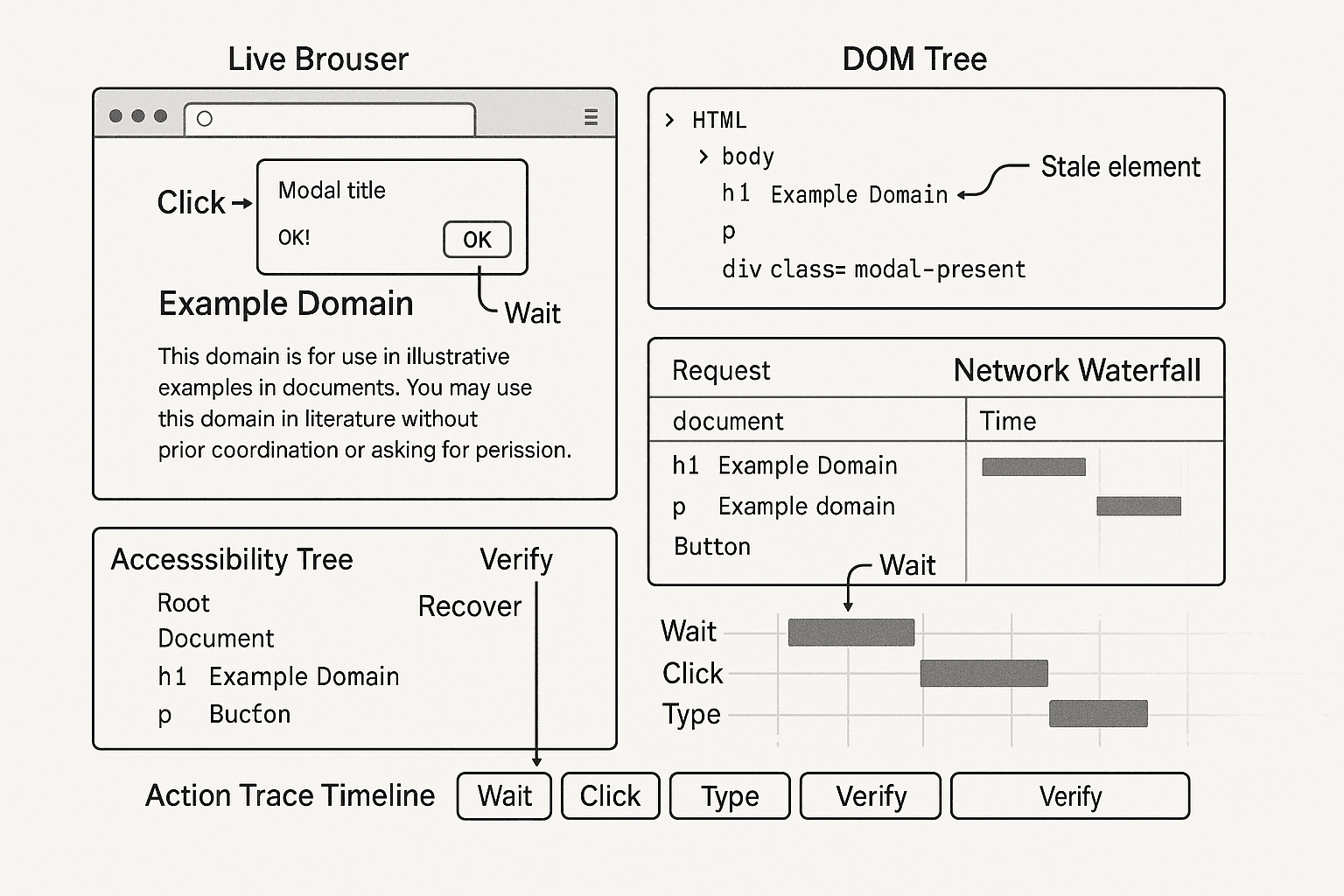
Execution Traces for Browser Agents: Mining Step-Level Recovery Data from Human Browsing to Train Reliable Action Policies
The fastest way to build a browser agent that looks impressive in a demo is to train it on screenshots and task descriptions.
The fastest way to build one that survives production is to stop treating browsing as a sequence of pretty images and start treating it as an execution trace.
That distinction matters more than most teams realize.
In real systems, browser tasks do not fail because the model cannot “understand the screenshot.” They fail because the agent clicked a node that was replaced during hydration, typed into an offscreen duplicate input, missed a modal that stole focus, used a selector that worked in headed mode but not headless, or declared success before the network and DOM settled into the expected state.
If you want reliable action policies, the training data needs to reflect that reality. That means collecting step-level traces from humans and scripts, with DOM state, accessibility metadata, event timing, network activity, action attempts, verification checks, and recovery behavior. Then you use those traces to train policies that do three things well:
- Choose the next action
- Verify whether the action actually changed the page state as intended
- Recover when assumptions are broken
This article is a practical blueprint for building that system.
I’ll go through the failure pattern that usually forces teams to redesign their stack, explain why naive datasets fail, then cover instrumentation, trace segmentation, labeling, runtime architecture, recovery loops, code examples, and production lessons from dynamic frontends.
The failure that forces this redesign
A team I worked with had an internal agent that could complete a checkout-like flow on a staging app with high success in evaluation. It was trained on screenshots plus textual descriptions of prior tasks, and at runtime it used a simple cycle:
- capture screenshot
- ask model for next action
- execute action
- repeat
On static pages, it looked fine.
On production web apps, logs looked like this:
text[run=91c2 step=6] action=click target="Continue"
[playwright] locator("text=Continue").click()
[playwright] waiting for element to be visible, enabled and stable
[playwright] element is visible, enabled and stable
[playwright] scrolling into view if needed
[playwright] done scrolling
[playwright] <button>Continue</button> intercepts pointer events
[playwright] retrying click action, attempt #1
[playwright] <div class="modal-backdrop fade show">...</div> intercepts pointer events
[playwright] retrying click action, attempt #2
[playwright] timeout 30000ms exceeded
Then on another run:
text[run=91c3 step=4] action=type target="Email"
[playwright] locator("input[name=email]").fill("user@example.com")
[playwright] done
[verify] expected field value=user@example.com
[verify] actual active element value=""
[verify] mismatch
And another:
text[run=91c4 step=8] action=click target="Submit"
[verify] expected URL to contain /confirmation
[verify] URL unchanged after 5s
[network] POST /api/submit -> 200
[dom] inline error banner inserted: "Please select a shipping option"
[agent] marked task complete incorrectly
And another:
text[run=91c5 step=3] action=click target="#country-dropdown"
[dom] node id=84731 detached during React re-render
[playwright] Error: Element is not attached to the DOM
[agent] retries same selector 3 times
[agent] task aborted
The problem wasn’t that the model lacked language ability. The system lacked an execution model.
The agent had no representation of:
- the DOM node it intended to act on
- the action preconditions required for success
- the postconditions that would confirm success
- the failure mode that occurred when action execution diverged
- the recovery moves a human would use next
Once you start instrumenting those pieces, reliability stops being a vague prompt-engineering problem and becomes a trainable control problem.
Root cause: browser tasks are state transitions, not captions
A browser session is a stream of state transitions:
- page state before action
- intended action over a specific target under specific preconditions
- observed effects after action
- decision about whether the state changed as expected
- if not, recovery strategy
Static screenshots throw away most of the information you need to model that loop.
What actually determines whether an action succeeds?
- whether the element was in the DOM at execution time
- whether it was visible, enabled, editable, focused, and unobstructed
- whether the frontend replaced the node between selection and action
- whether the page entered a loading or transitional state
- whether the action triggered network activity
- whether the expected semantic state change happened
- whether the user had to dismiss a modal, scroll, wait, or re-locate the element
Those are not image-only concepts. They are execution-trace concepts.
A useful browser-agent dataset therefore needs to preserve, per step:
- Intent: what outcome the actor was trying to achieve
- Observation: page state from DOM, accessibility tree, visual snapshot, URL, network, active element
- Action: the concrete operation and target
- Preconditions: what had to be true before execution
- Postconditions: what should be true after execution
- Outcome: success, partial success, no-op, failure
- Failure mode: stale element, obstruction, validation error, timeout, async race, etc.
- Recovery: what the actor did next to get unstuck
This is why execution traces are so valuable: they capture both the intended policy and the repair policy.
Why naive approaches fail
1. Screenshot-to-action datasets miss action semantics
A screenshot may show a button labeled “Continue,” but it won’t tell you:
- there were two identical buttons, one hidden in a sticky footer clone
- the visible one was disabled until a checkbox was selected
- a cookie banner intercepted clicks
- the human actually tabbed to it because pointer events were blocked
If your model only sees pixels and a task prompt, it learns brittle shortcuts.
2. DOM snapshots alone are not enough
Teams often swing too far in the other direction and store only HTML.
Raw DOM snapshots also miss critical runtime behavior:
- rendering transitions
- event listeners and focus changes
- network requests tied to user actions
- detached nodes after framework re-render
- shadow DOM or iframe boundaries
- timing between “action issued” and “state settled”
A DOM dump is a document. A trace is a process.
3. One-step imitation collapses under ambiguity
Suppose the next action is “click Submit.” Fine. But what if clicking doesn’t navigate?
A robust agent must know whether to:
- wait for network idle
- inspect inline validation errors
- re-check required fields
- dismiss a modal
- re-locate the button after re-render
If training only labels the nominal action and never the recovery branches, runtime behavior will be optimistic and wrong.
4. “Just retry” makes reliability worse
A common runtime patch is blind retries.
That often amplifies failures:
- retrying a stale selector after React replaced the subtree
- clicking through a loading overlay repeatedly
- submitting a form multiple times
- waiting on the wrong condition while the real issue is a validation banner
Retries need to be conditioned on observed failure modes, not applied generically.
The architecture: trace-first browser-agent training and control
The core architecture has two halves:
- Data pipeline: collect high-fidelity traces from humans and scripted runs, then segment and label them into training examples
- Runtime control loop: execute step-wise policies that choose actions, verify effects, classify failures, and recover using trace-derived strategies
At a high level:
textHuman browsing / scripted browsing
        |
        v
Instrumentation layer
  - DOM snapshots / diffs
  - Accessibility tree
  - Network events
  - Console / errors
  - Screenshots
  - Input events
  - Playwright action logs
        |
        v
Trace store
        |
        v
Segmentation
  - intent-action-observation tuples
  - pre/post conditions
  - action outcomes
        |
        v
Labeling / mining
  - success transitions
  - failure modes
  - recovery demonstrations
        |
        v
Training sets
  - action selection
  - state verification
  - failure classification
  - recovery ranking
        |
        v
Runtime agent
  - observe
  - propose action candidates
  - rank
  - execute
  - verify
  - recover
The key design choice is that recovery is a first-class artifact in both data and runtime.
Instrumenting browsing sessions correctly
You need traces from both human and scripted sessions.
Humans give you realistic recovery behavior. Scripts give you coverage and reproducibility.
What to capture at each layer
1. DOM layer
Capture:
- current URL
- serialized DOM tree or pruned DOM subtree set
- stable node identifiers when possible
- computed visibility and bounding boxes for interactive elements
- focused element
- iframe/shadow DOM boundaries
- mutation events or DOM diffs over time
In dynamic frontends, full DOM serialization on every event is expensive. In practice, use:
- periodic full snapshots
- incremental mutation logs between snapshots
- a focused extraction of actionable nodes
Useful per-node fields:
- tag name
- text content
- attributes: id, name, role, aria-*, placeholder, type, href
- DOM path / CSS path / XPath-like path
- bounding box
- visibility flags
- enabled/disabled
- checked/selected
- editable
- z-index / obstruction hints
2. Accessibility layer
Accessibility metadata is often more stable than CSS selectors.
Capture:
- AX role
- accessible name
- description/help text
- state flags: disabled, expanded, selected, checked
- relationships where available
For browser agents, the accessibility tree is not just for compliance. It’s a high-signal semantic view of actionable UI.
3. Network layer
Capture:
- request start/end timestamps
- method, URL, resource type
- status codes
- redirects
- failed requests
- API calls triggered near an action
This helps separate “click did nothing” from “click succeeded but UI took time to update” from “server returned validation response.”
4. Input/action layer
For humans:
- click coordinates
- key events
- scrolls
- text input
- focus/blur
- tab navigation
For scripts:
- exact Playwright action invoked
- target locator(s)
- timing
- retries
- exceptions
5. Visual layer
Store screenshots, but as supporting evidence, not the primary truth.
You want:
- full-page screenshot periodically
- viewport screenshot before and after actions
- optional DOM-overlay render of candidate targets
6. Console and error layer
Capture:
- console errors/warnings
- uncaught exceptions
- failed resource loads
- page crashes/dialog events
These often explain weird “the click worked but the page never updated” cases.
Playwright-based instrumentation: Python example
Here’s a practical trace collector using Playwright in Python. This is not a full production recorder, but it shows the shape of the implementation.
pythonimport asyncio
import json
import time
from pathlib import Path
from playwright.async_api import async_playwright

TRACE_DIR = Path("./trace_runs")
TRACE_DIR.mkdir(exist_ok=True)

JS_EXTRACT_ACTIONABLES = r'''
() => {
  function isVisible(el) {
    const style = window.getComputedStyle(el);
    const rect = el.getBoundingClientRect();
    return !!(
      rect.width > 0 && rect.height > 0 &&
      style.visibility !== 'hidden' &&
      style.display !== 'none'
    );
  }

  function accessibleName(el) {
    return el.getAttribute('aria-label') ||
           el.getAttribute('alt') ||
           el.innerText?.trim() ||
           el.getAttribute('placeholder') ||
           el.getAttribute('name') || '';
  }

  const selector = [
    'a', 'button', 'input', 'select', 'textarea',
    '[role="button"]', '[role="link"]', '[role="textbox"]',
    '[tabindex]'
  ].join(',');

  return Array.from(document.querySelectorAll(selector)).map((el, idx) => {
    const rect = el.getBoundingClientRect();
    return {
      idx,
      tag: el.tagName.toLowerCase(),
      type: el.getAttribute('type'),
      text: (el.innerText || '').trim().slice(0, 200),
      name: accessibleName(el).slice(0, 200),
      id: el.id || null,
      classes: el.className || null,
      role: el.getAttribute('role') || null,
      href: el.getAttribute('href') || null,
      placeholder: el.getAttribute('placeholder') || null,
      disabled: !!el.disabled || el.getAttribute('aria-disabled') === 'true',
      checked: !!el.checked,
      value: (el.value || '').slice(0, 200),
      visible: isVisible(el),
      bbox: {
        x: rect.x, y: rect.y, width: rect.width, height: rect.height
      }
    };
  });
}
'''

async def snapshot_state(page, step_name):
  timestamp = time.time()
  screenshot_path = TRACE_DIR / f"{int(timestamp*1000)}_{step_name}.png"
  await page.screenshot(path=str(screenshot_path), full_page=False)

  actionables = await page.evaluate(JS_EXTRACT_ACTIONABLES)
  url = page.url
  title = await page.title()
  html = await page.content()

  return {
    "ts": timestamp,
    "step_name": step_name,
    "url": url,
    "title": title,
    "screenshot": str(screenshot_path),
    "actionables": actionables,
    "html": html[:500000],
  }

async def main():
  network_events = []
  console_events = []

  async with async_playwright() as p:
    browser = await p.chromium.launch(headless=True)
    context = await browser.new_context()
    page = await context.new_page()

    page.on("console", lambda msg: console_events.append({
      "ts": time.time(), "type": msg.type, "text": msg.text
    }))

    page.on("request", lambda req: network_events.append({
      "ts": time.time(), "kind": "request", "url": req.url,
      "method": req.method, "resource_type": req.resource_type
    }))

    page.on("response", lambda res: network_events.append({
      "ts": time.time(), "kind": "response", "url": res.url,
      "status": res.status
    }))

    trace = {"steps": [], "network": network_events, "console": console_events}

    await page.goto("https://example.com")
    trace["steps"].append(await snapshot_state(page, "after_goto"))

    # Example action wrapper
    try:
      before = await snapshot_state(page, "before_click_more_info")
      await page.locator("text=More information").click(timeout=5000)
      await page.wait_for_load_state("networkidle", timeout=5000)
      after = await snapshot_state(page, "after_click_more_info")
      trace["steps"].append({
        "action": {
          "type": "click",
          "target": "text=More information",
          "status": "success"
        },
        "before": before,
        "after": after,
      })
    except Exception as e:
      after_error = await snapshot_state(page, "after_click_error")
      trace["steps"].append({
        "action": {
          "type": "click",
          "target": "text=More information",
          "status": "error",
          "error": repr(e)
        },
        "before": before,
        "after": after_error,
      })

    out = TRACE_DIR / "trace.json"
    out.write_text(json.dumps(trace, indent=2))
    await browser.close()

asyncio.run(main())
This captures enough to begin mining step transitions, but for production training you’ll want richer node identity and mutation tracking.
DOM parsing under dynamic frontends
Dynamic frontends are where most trace pipelines become misleading.
Three problems show up repeatedly.
1. Nodes are replaced, not updated
React, Vue, and component libraries often re-render chunks of the tree, invalidating node handles. If your trace only records a CSS selector, you can’t distinguish:
- selector still valid, same logical node
- selector valid, different clone
- original node detached and replaced
You need logical target identity features, not just raw selectors.
A practical target identity record contains:
- selector used at execution time
- normalized text/accessibility name
- surrounding container signature
- relative position among sibling candidates
- DOM ancestry summary
- bbox and viewport coordinates
2. Hidden duplicates are everywhere
Responsive layouts, portals, and headless-specific rendering often create duplicate elements.
Examples:
- desktop and mobile nav links both present in DOM
- offscreen modal templates
- hidden input mirrors
- sticky footer clone of CTA button
Candidate ranking must incorporate visibility, hit-testability, and obstruction checks.
3. Full HTML is expensive and noisy
Massive SPA HTML dumps become expensive to store and difficult to train on.
The fix is to build a pruned representation for each step:
- actionable nodes
- ancestors up to a fixed depth
- relevant text blocks near the action target
- current forms, dialogs, alerts, toasts
- active loading indicators
Keep the full HTML or DOM snapshot for debugging, but train primarily on a structured action-centric view.
Segmenting traces into intent-action-observation tuples
Raw traces are not training data yet.
You need to segment them into step-level examples.
A useful unit is:
text(intent, observation_t, action_t, observation_t+1, outcome)
Where:
- intent = the local subgoal, not just the top-level task
- observation_t = state before action
- action_t = target + action type + arguments
- observation_t+1 = resulting state after settle window
- outcome = success/failure/partial/no-op
How to infer local intent
For human traces, local intent is not always explicitly available. You can derive it from:
- the top-level task description
- the sequence of nearby actions
- the target semantics
- resulting state transitions
Examples:
- top-level task: “Book a flight”
- local intent around step: “Open passenger count dropdown”
- next local intent: “Select 2 adults”
Don’t force everything into one monolithic prompt string. Local intent labels make recovery policies much easier to learn.
Settle windows matter
One common mistake is capturing observation_t+1 immediately after the action returns.
In browser automation, the right “after” state often exists only after a settle policy such as:
- wait for DOM mutation quiet period
- wait for network quiet period
- wait for target postcondition
- timeout to bounded fallback
Store both:
- immediate post-action observation
- settled observation
The gap between them is informative for async race failures.
Labeling preconditions, postconditions, and failure modes
This is where traces become operationally useful.
Preconditions
Preconditions define whether an action should be attempted.
For example, a click on a button may require:
- node exists
- node visible
- node enabled
- node unobstructed
- page not in loading overlay state
- correct frame focused
A type action may require:
- editable control present
- input not readonly
- input focusable
- value not already correct, unless overwrite intended
You can auto-label many preconditions from trace state.
Postconditions
Postconditions define whether the action achieved the intended state transition.
Examples:
- URL changed to expected route
- dropdown expanded
- field value updated
- validation error disappeared
- modal closed
- network request returned 2xx
- confirmation message visible
The postcondition should be tied to the local intent, not generic “page changed.”
Failure modes
A practical failure taxonomy for browser agents includes:
selector_not_foundstale_element_detachedelement_not_visibleelement_disabledclick_interceptedwrong_target_duplicatemodal_interruptionnavigation_timeoutasync_loading_racevalidation_errorno_state_changeunexpected_navigationiframe_context_missheadless_render_difference
You can infer these from a combination of Playwright errors, DOM diffs, network patterns, and postcondition checks.
For example:
textError: Element is not attached to the DOM
=> stale_element_detached

Click returned, no navigation, inline error banner appeared
=> validation_error

Click timed out with backdrop intercepting pointer events
=> modal_interruption or click_intercepted
Mining recovery demonstrations from traces
This is the highest-value part of the pipeline.
If a human failed to click “Continue” because a cookie banner was covering the button, and then dismissed the banner and retried successfully, that sequence is gold.
Represent it as:
textattempt(click Continue) -> failure(click_intercepted by modal/banner)
recovery(dismiss modal)
retry(click Continue) -> success
Likewise:
textattempt(type email) -> failure(wrong target duplicate hidden input)
recovery(refocus visible email textbox)
retry(type email) -> success
These are not just examples of action selection. They are examples of state-aware repair policies.
You should explicitly index recovery patterns by:
- page context signature
- failure mode
- attempted action type
- target semantics
- successful recovery sequence
At runtime, this can support retrieval-augmented recovery: “for stale detached elements in React dropdowns, what repair sequences worked before?”
Candidate action generation and ranking
At runtime, step-wise policies work best when separated into two stages:
- generate candidate actions
- rank/select among them
Candidate generation
From the current observation, generate a small set of plausible actions based on:
- visible actionable nodes
- local intent
- recovery context if previous step failed
- standard control actions: wait, scroll, close modal, go back, refocus
Example candidate set for intent “submit shipping form”:
- click visible button name=Submit
- click visible button name=Continue
- select radio option for shipping method
- dismiss cookie banner
- wait for loading spinner to disappear
- scroll to first validation error
Ranking features
Action ranking should incorporate both semantic and execution features:
- text/name match to intent
- accessibility role match
- visibility / hit-testability
- enabled/editable state
- proximity to relevant labels
- target uniqueness
- past success frequency in similar traces
- risk score based on failure history
- current failure mode context
A simple learned ranker over engineered features often outperforms a giant end-to-end policy early on.
Runtime control loop
A reliable browser agent loop looks more like this than the naive screenshot loop:
textobserve state
infer local intent
generate candidate actions
rank candidates
validate preconditions
execute chosen action
collect immediate effects
run verification checks
if postconditions satisfied: continue
else classify failure
select recovery action(s)
execute recovery within budget
re-verify
The important pieces are verification and failure classification.
Verification should be explicit
Never treat “Playwright action returned without exception” as success.
Examples:
- click succeeded mechanically, but no expected state change happened
- fill succeeded on the wrong input clone
- press Enter submitted stale form state
Verification should check intent-specific postconditions.
Recovery should be budgeted
Do not allow unlimited retries.
Use per-step and per-task budgets such as:
- max 2 retries for same intent with new target resolution
- max 1 modal-dismiss attempt before escalation
- max 8 seconds cumulative wait budget for async settle
- max 3 recovery actions before fallback/handoff
Budgets prevent infinite loops and duplicated submissions.
JavaScript Playwright example: instrumented action pipeline with verification and recovery
Here is a more realistic Node.js sketch of an action executor.
javascriptconst { chromium } = require('playwright');

async function extractState(page) {
  const state = await page.evaluate(() => {
    function visible(el) {
      const s = getComputedStyle(el);
      const r = el.getBoundingClientRect();
      return r.width > 0 && r.height > 0 && s.display !== 'none' && s.visibility !== 'hidden';
    }

    const nodes = [...document.querySelectorAll('button, a, input, select, textarea, [role="button"], [role="dialog"], [aria-live]')]
      .map((el, i) => {
        const r = el.getBoundingClientRect();
        return {
          i,
          tag: el.tagName.toLowerCase(),
          role: el.getAttribute('role'),
          text: (el.innerText || '').trim().slice(0, 120),
          ariaLabel: el.getAttribute('aria-label'),
          placeholder: el.getAttribute('placeholder'),
          disabled: !!el.disabled || el.getAttribute('aria-disabled') === 'true',
          visible: visible(el),
          value: el.value || '',
          bbox: { x: r.x, y: r.y, w: r.width, h: r.height }
        };
      });

    return {
      url: location.href,
      title: document.title,
      activeTag: document.activeElement ? document.activeElement.tagName.toLowerCase() : null,
      dialogs: nodes.filter(n => n.role === 'dialog' && n.visible),
      liveRegions: nodes.filter(n => n.visible && n.tag === 'div' && n.role === null && n.text),
      nodes
    };
  });

  return state;
}

function classifyFailure(errorText, before, after, verification) {
  const e = (errorText || '').toLowerCase();
  if (e.includes('not attached')) return 'stale_element_detached';
  if (e.includes('intercepts pointer events')) return 'click_intercepted';
  if (before.dialogs.length === 0 && after.dialogs.length > 0) return 'modal_interruption';
  if (!verification.ok && verification.reason === 'no_state_change') return 'no_state_change';
  if (!verification.ok && verification.reason === 'validation_error') return 'validation_error';
  return 'unknown_failure';
}

async function verifyPostcondition(page, intent) {
  const url = page.url();
  const bodyText = await page.locator('body').innerText().catch(() => '');

  if (intent.kind === 'submit_form') {
    if (url.includes(intent.expectUrlContains)) {
      return { ok: true, reason: 'url_changed' };
    }
    if (bodyText.includes('required') || bodyText.includes('Please select')) {
      return { ok: false, reason: 'validation_error' };
    }
    return { ok: false, reason: 'no_state_change' };
  }

  if (intent.kind === 'fill_email') {
    const value = await page.locator(intent.targetSelector).inputValue().catch(() => '');
    if (value === intent.expectedValue) {
      return { ok: true, reason: 'value_set' };
    }
    return { ok: false, reason: 'no_state_change' };
  }

  return { ok: true, reason: 'generic' };
}

async function dismissModalIfPresent(page) {
  const candidates = [
    page.getByRole('button', { name: /close|dismiss|accept|got it|ok/i }).first(),
    page.getByRole('button', { name: /continue/i }).first()
  ];

  for (const locator of candidates) {
    try {
      if (await locator.isVisible({ timeout: 500 })) {
        await locator.click({ timeout: 2000 });
        return true;
      }
    } catch (_) {}
  }
  return false;
}

async function executeStep(page, step, budget) {
  const before = await extractState(page);
  let errorText = null;

  try {
    if (step.action.type === 'click') {
      await page.locator(step.action.selector).click({ timeout: 4000 });
    } else if (step.action.type === 'fill') {
      await page.locator(step.action.selector).fill(step.action.value, { timeout: 4000 });
    } else if (step.action.type === 'press') {
      await page.locator(step.action.selector).press(step.action.key, { timeout: 4000 });
    }
  } catch (e) {
    errorText = String(e);
  }

  await page.waitForLoadState('domcontentloaded').catch(() => {});
  await page.waitForTimeout(800);

  const after = await extractState(page);
  const verification = await verifyPostcondition(page, step.intent);

  if (!errorText && verification.ok) {
    return { status: 'success', before, after, verification };
  }

  const failureMode = classifyFailure(errorText, before, after, verification);

  if (budget.recoveryAttempts <= 0) {
    return { status: 'failure', before, after, verification, errorText, failureMode };
  }

  if (failureMode === 'click_intercepted' || failureMode === 'modal_interruption') {
    const dismissed = await dismissModalIfPresent(page);
    if (dismissed) {
      budget.recoveryAttempts -= 1;
      return await executeStep(page, step, budget);
    }
  }

  if (failureMode === 'stale_element_detached') {
    budget.recoveryAttempts -= 1;
    // In production, re-resolve using semantic target matching rather than same raw selector.
    return await executeStep(page, step, budget);
  }

  return { status: 'failure', before, after, verification, errorText, failureMode };
}

(async () => {
  const browser = await chromium.launch({ headless: true });
  const page = await browser.newPage();
  await page.goto('https://example.com');

  const step = {
    intent: { kind: 'submit_form', expectUrlContains: 'confirmation' },
    action: { type: 'click', selector: 'text=Submit' }
  };

  const result = await executeStep(page, step, { recoveryAttempts: 2 });
  console.log(JSON.stringify(result, null, 2));
  await browser.close();
})();
This sketch leaves out learned ranking, but it demonstrates the core shape:
- capture before state
- execute action
- wait for settle
- verify postcondition
- classify failure
- attempt targeted recovery within budget
That loop is what you should be training from traces.
Headless-specific issues you must account for
A lot of teams collect traces in headed mode and deploy in headless mode, then wonder why reliability drops.
This is common.
Typical headless differences
- viewport defaults differ
- fonts render differently and alter layout
- lazy-loaded content may trigger at different scroll positions
- anti-bot or consent flows may differ
- timing changes expose async races
- focus behavior can differ for synthetic typing paths
What to do
- collect both headed and headless traces when possible
- normalize viewport, locale, timezone, user agent, permissions
- log mode as part of trace metadata
- include headless-specific failure labels
- prefer semantic targeting over absolute coordinates or fragile CSS classes
If you see selectors only failing in headless mode, inspect whether the target became hidden, overlapped, or replaced by a responsive variant.
Training step-wise policies from trace data
Once your traces are segmented and labeled, you can train separate models or modules for distinct decisions.
1. Action selection policy
Input:
- local intent
- current structured observation
- previous step outcome
Output:
- ranked candidate action
This can be trained with supervised ranking from successful next actions in traces.
2. Verification policy
Input:
- intent
- before state
- action
- after state
- network effects
Output:
- success / failure / partial success
- postcondition explanation
This is critical because execution success is not enough.
3. Failure classifier
Input:
- action error
- DOM/accessibility deltas
- network events
- visual/dialog indicators
Output:
- failure mode label
A compact classifier here gives you much more reliable recovery than a general model trying to infer everything from scratch at runtime.
4. Recovery policy
Input:
- current intent
- attempted action
- failure mode
- current observation
- similar historical recovery traces
Output:
- next recovery action or sequence
This is where trace-derived demonstrations pay off. Humans are surprisingly consistent in how they recover from common browser issues. Mine those patterns.
Practical labeling heuristics that work well
You do not need to hand-label everything.
Good heuristic labels can get you surprisingly far.
Selector stale / detached
From error text:
textElement is not attached to the DOM
Execution context was destroyed
Label:
stale_element_detached
Click intercepted
From Playwright logs:
textintercepts pointer events
another element would receive the click
Label:
click_intercepted
Modal interruption
If a dialog/backdrop appears between before and after, or a visible role=dialog exists when action fails:
modal_interruption
Validation error
If submit action does not navigate and a visible error banner/message appears:
validation_error
Async loading race
If expected target appears shortly after an initial failure or network activity remains active during verification:
async_loading_race
Wrong duplicate target
If fill/click succeeded mechanically but postcondition failed and another semantically similar visible element exists:
wrong_target_duplicate
These labels are good enough to bootstrap recovery policies.
Production considerations
1. Trace storage gets large fast
DOM snapshots, screenshots, and network logs are expensive.
Use a tiered strategy:
- structured step summaries for training
- compressed full traces for debugging and replay
- retention policies by task value and failure incidence
2. PII and secrets need explicit handling
If you record real human sessions, you must redact aggressively.
Redact at collection time where possible:
- input values
- auth tokens
- cookies
- email addresses
- payment fields
- addresses and phone numbers
Store typed text as typed-event metadata with masking rules, not raw sensitive values.
3. Reproducibility matters more than volume
Ten million low-fidelity traces are less useful than a smaller corpus with:
- exact timing
- action outcomes
- failure labels
- stable environment metadata
4. Verification logic should be testable independently
Build unit tests for postcondition detectors and failure classifiers.
A lot of runtime flakiness comes from bad verification, not bad action selection.
5. Human recovery traces are your highest-leverage dataset
If you can only afford to instrument one thing deeply, instrument failed sessions and their recoveries.
Nominal paths are easy. Recovery is what makes agents production-ready.
6. Build trace replay tools early
You want an internal viewer that can show:
- timeline of actions
- before/after screenshots
- DOM diff
- accessibility diff
- network waterfall
- verification result
- failure classification
- recovery branch
Without this, your debugging loop will be painfully slow.
What this looks like in a mature system
In a mature browser-agent stack, the model is not a single black-box “browse the web” component.
It is part of a control system with distinct responsibilities:
- observer builds structured page state
- intent tracker maintains local subgoal
- candidate generator proposes possible actions
- ranker/policy selects action
- executor performs it through Playwright
- verifier checks postconditions
- failure classifier names what went wrong
- recovery module picks repair steps from learned traces
- budget manager limits retries and escalates when needed
Execution traces are the common substrate tying all of those together.
Once you have that, you can answer operational questions clearly:
- which actions fail most often?
- which failure modes dominate by site/app?
- which recoveries are actually effective?
- where do headless differences matter?
- are we improving because action choice got better, or because verification got stricter?
Without trace-level data, those questions turn into guesswork.
Takeaways
If you are building browser agents and your dataset consists mainly of screenshots plus prompts, you are missing the most important training signal: how actions succeed or fail over time.
The practical path to reliable policies is:
- Instrument real browsing sessions at DOM, accessibility, action, network, and error layers
- Segment traces into step-level tuples with local intent, action, before/after observations, and outcomes
- Label preconditions and postconditions so success is defined as state transition, not merely action execution
- Classify common browser failure modes like stale elements, click interception, modals, validation errors, and async races
- Mine recovery demonstrations explicitly from human and scripted traces
- Train separate step-wise modules for action ranking, verification, failure classification, and recovery
- Run a budgeted control loop in production that verifies every step and recovers intentionally rather than blindly retrying
The main mindset shift is simple:
A browser agent is not just deciding what to click next.
It is operating a feedback loop in a hostile, asynchronous UI environment.
Execution traces are how you teach it to survive that environment.
If you build around traces, you stop optimizing for screenshot plausibility and start optimizing for reliable state transitions. That is the difference between an agent that demos well and an agent that keeps working when the frontend changes, the modal appears, the selector breaks, or the page takes three more seconds than usual.
That difference is most of the engineering work.