
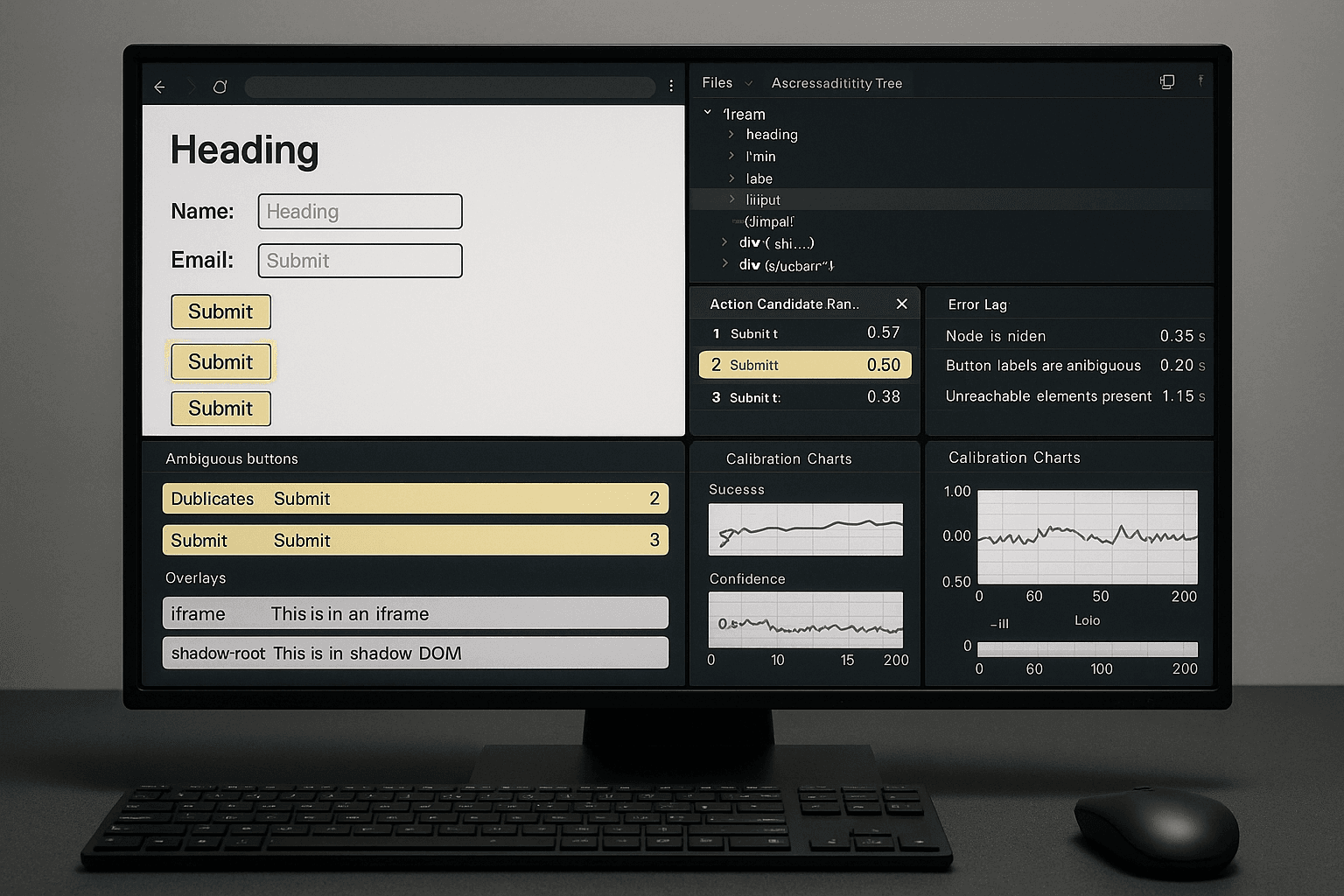
Hard-Negative Mining for Browser Agents: Training on Ambiguous DOMs, Near-Miss Actions, and Recovery-Critical Failures
Browser agents do not usually fail because the target is completely invisible. They fail because the wrong target looks reasonable.
A button says Continue in two places. A checkout page renders a sticky footer with another Pay now. An address form hydrates late, so the field exists in the DOM but is not yet editable. A cookie banner intercepts the click. A support widget inside an iframe overlaps the element for 300 ms. A shadow-root component exposes the visible label, but the selector pipeline only sees the host node. The agent acts on a plausible candidate, gets a valid browser response, and drifts into an expensive state.
Those are the failures that matter in production.
If you are building browser agents for shopping, booking, or extraction flows, standard positive-only imitation data is not enough. You need hard negatives: wrong-but-plausible actions collected from real sessions, preserved with DOM state, candidate sets, timing context, and recovery outcome. This article is an implementation-first blueprint for doing that.
I will focus on a concrete engineering loop:
- Log action candidate sets from the DOM and accessibility tree at each step.
- Capture the chosen action, the oracle/best action, and all plausible alternatives.
- Label near-misses and recovery-critical mistakes.
- Train rerankers and action selectors on contrastive examples.
- Inject uncertainty-aware checks back into the step-wise execution loop.
- Evaluate not just completion rate, but avoidance of high-cost mistakes.
The details below assume Playwright-based execution, but the ideas transfer to any browser control stack.
A real failure
Here is a representative incident from a retail checkout agent.
The task:
Add a product to cart, open cart, proceed to checkout, select the cheapest shipping option, and stop before final payment.
The page had two visible Continue buttons after cart review:
- one in the main checkout flow,
- one in a newsletter upsell drawer anchored to the side.
Both were visible. Both had similar dimensions. Both were actionable according to the DOM. The browser agent clicked the upsell drawer button.
That did not produce a fatal automation error.
Instead, it opened a modal, trapped focus, changed the tab order, and shifted the main CTA below the fold. The next action attempted to fill the shipping ZIP code, but the input was now hidden behind the modal overlay. The selector recovered by finding another ZIP field in a marketing lead form. That submission triggered validation. After three wrong-but-valid interactions, the session was unrecoverable without a full reset.
The logs looked like this:
text[step=12] intent=proceed_to_checkout
  candidates=7
  top1=role=button name="Continue" css="#upsell-drawer button.primary"
  top2=role=button name="Continue" css="main form button[data-test='checkout-continue']"
  top3=role=link name="Checkout"
  chosen=top1
  score=0.61 margin=0.03
  page_url=https://shop.example.com/cart

[step=13] action=click target="#upsell-drawer button.primary"
  result=success
  dom_mutation_count=48
  navigation=false
  overlay_detected=true
  focus_trap=true

[step=14] intent=fill_shipping_zip
  candidates=4
  top1=input[name="zip"] form="#lead-capture"
  top2=input[name="postalCode"] form="#shipping-address"
  chosen=top1
  score=0.54 margin=0.02

[step=15] action=type target="input[name='zip']"
  result=success
  downstream_state=lead_form_validation_error
  recovery_attempted=true
  recovery_failed=true
This is the failure profile you should care about:
- the chosen action was plausible,
- the environment accepted it,
- recovery became more expensive after each step,
- simple success/failure metrics undercount the problem because there was no immediate exception.
Root cause
The root cause was not “bad selector quality” in the narrow sense. It was that the system lacked hard-negative supervision and calibrated uncertainty handling.
The action model saw two visually and semantically similar candidates. It preferred one by a tiny margin. That small score delta was treated as sufficient confidence. There was no mechanism to say:
- these candidates are near-ties,
- one is inside a secondary marketing surface,
- clicking either will succeed mechanically,
- but one has much higher task risk,
- therefore defer, verify, or gather more evidence.
In other words, the model was trained mostly on positives: “here is the right button.” It was not trained on the thing that actually dominates production failures: “here is the wrong button that looks right.”
That distinction matters.
Browser automation stacks usually contain at least three ranking problems:
- Action type selection: click, type, select, wait, scroll, dismiss, switch frame, etc.
- Target selection: which node or locator to act on.
- Execution timing: act now, wait for stability, or trigger a recovery path.
Hard negatives improve all three.
Why naive approaches fail
1. Positive-only imitation hides ambiguity
If your dataset stores only the final chosen node, every other candidate disappears. During training, the model learns a point target, not a decision boundary under ambiguity.
Example of a weak training row:
json{
  "intent": "proceed_to_checkout",
  "page_text": "...",
  "target": "main form button[data-test='checkout-continue']"
}
What is missing:
- the competing upsell drawer button,
- whether both were visible,
- the a11y names,
- their positions,
- whether one sat inside a modal or secondary region,
- whether one caused costly divergence.
Without candidate context, the model cannot learn contrast.
2. Generic retry logic treats semantic mistakes like transport failures
A lot of agent loops recover from everything using the same playbook:
- retry the click,
- wait 500 ms,
- re-query the DOM,
- use a fallback selector,
- reload if needed.
That works for stale handles or transient rendering delays. It does not work when the agent performed the wrong valid action. Retrying a semantic mistake usually deepens the error.
3. Raw DOM selectors miss interaction context
CSS/XPath-only systems often miss key distinctions:
- accessibility name and role,
- z-index and overlay interception,
- whether the node is inside an iframe,
- whether the node is part of a shadow-root,
- whether the element is actually stable and clickable,
- whether the action changes URL, focus, form state, or modal state.
The right unit of training is not just “selector.” It is candidate action with context and expected consequence.
4. Success rate alone rewards risky behavior
Suppose Agent A finishes 78% of shopping flows but occasionally clicks Place order instead of Review order in edge cases. Agent B finishes 75% but never triggers irreversible purchase actions incorrectly.
Which system is better for production? Usually Agent B.
If your metrics are only end-task success, you will optimize the wrong behavior.
Architecture: a hard-negative mining pipeline for browser agents
At a high level, the architecture has five layers:
- Instrumentation: capture DOM/a11y/action candidate sets at every decision step.
- Failure mining: identify near-miss and recovery-critical wrong actions from sessions.
- Labeling: score negatives by plausibility and cost.
- Training: build rerankers and calibrated action selectors using contrastive examples.
- Runtime integration: use uncertainty thresholds and recovery-aware policies in the executor.
A simple data flow looks like this:
textPlaywright session
  -> DOM snapshot + a11y snapshot + screenshots
  -> candidate generator
  -> action scoring/ranking
  -> chosen action + alternatives logged
  -> execution outcome + recovery trace
  -> hard-negative miner
  -> training dataset
  -> reranker / selector / calibrator
  -> deployed execution loop
The most important design choice: log candidate sets before action execution, not just the final action after the fact.
If you only log failures after the page has changed, you lose the exact ambiguity surface that produced the wrong decision.
Instrumentation: logging candidate action sets from DOM and a11y tree
You need a candidate generator that merges signals from:
- DOM traversal,
- accessibility tree,
- viewport geometry,
- interactivity checks,
- frame/shadow-root ancestry,
- local text context,
- state transitions after action.
What to log per candidate
At minimum:
- action type: click/type/select/check/uncheck/wait/dismiss/switch_frame
- role, tag, input type
- visible text and computed accessible name
- placeholder, aria-label, aria-describedby
- DOM path and stable attributes
- bounding box and viewport intersection
- z-index / stacking context approximation
- enabled/disabled/editable state
- frame id / frame URL
- shadow-root ancestry
- nearby text context
- form ancestry / landmark region / modal ancestry
- current URL and step intent
- candidate score from each model stage
- execution consequence if chosen historically
Playwright: collect browser-side node metadata
Here is a Python Playwright pattern for collecting action candidates. In production, I usually execute JS in-page for traversal and only bring back compact structured records.
pythonfrom playwright.sync_api import sync_playwright
import json
import time
from typing import Any, Dict, List

CANDIDATE_JS = r"""
() => {
  function isVisible(el) {
    const style = window.getComputedStyle(el);
    if (!style) return false;
    if (style.visibility === 'hidden' || style.display === 'none') return false;
    const rect = el.getBoundingClientRect();
    return rect.width > 0 && rect.height > 0;
  }

  function isInteractable(el) {
    const tag = (el.tagName || '').toLowerCase();
    const role = el.getAttribute('role');
    if (el.disabled) return false;
    if (tag === 'button' || tag === 'select' || tag === 'textarea') return true;
    if (tag === 'input' && el.type !== 'hidden') return true;
    if (tag === 'a' && el.href) return true;
    if (role && ['button', 'link', 'checkbox', 'radio', 'tab', 'textbox', 'combobox'].includes(role)) return true;
    if (typeof el.onclick === 'function') return true;
    if (el.hasAttribute('contenteditable')) return true;
    return false;
  }

  function cssPath(el) {
    if (!(el instanceof Element)) return '';
    const parts = [];
    while (el && el.nodeType === Node.ELEMENT_NODE && parts.length < 6) {
      let part = el.nodeName.toLowerCase();
      if (el.id) {
        part += '#' + CSS.escape(el.id);
        parts.unshift(part);
        break;
      }
      if (el.classList && el.classList.length) {
        part += '.' + [...el.classList].slice(0, 2).map(c => CSS.escape(c)).join('.');
      }
      const parent = el.parentElement;
      if (parent) {
        const siblings = [...parent.children].filter(x => x.nodeName === el.nodeName);
        if (siblings.length > 1) {
          part += `:nth-of-type(${siblings.indexOf(el) + 1})`;
        }
      }
      parts.unshift(part);
      el = parent;
    }
    return parts.join(' > ');
  }

  function accName(el) {
    return el.getAttribute('aria-label') ||
      el.getAttribute('title') ||
      el.innerText?.trim()?.slice(0, 200) ||
      el.getAttribute('placeholder') ||
      '';
  }

  function regionInfo(el) {
    const modal = el.closest('[role="dialog"], dialog, [aria-modal="true"]');
    const form = el.closest('form');
    const landmark = el.closest('main, nav, aside, header, footer, [role="main"], [role="navigation"], [role="complementary"]');
    return {
      in_modal: !!modal,
      modal_selector: modal ? cssPath(modal) : None,
      form_selector: form ? cssPath(form) : null,
      landmark_selector: landmark ? cssPath(landmark) : null,
      landmark_tag: landmark ? landmark.tagName.toLowerCase() : null,
    };
  }

  const all = [...document.querySelectorAll('*')];
  const candidates = [];
  for (const el of all) {
    if (!isVisible(el) || !isInteractable(el)) continue;
    const rect = el.getBoundingClientRect();
    const style = window.getComputedStyle(el);
    const info = regionInfo(el);
    candidates.push({
      tag: (el.tagName || '').toLowerCase(),
      type: el.getAttribute('type'),
      role: el.getAttribute('role'),
      text: (el.innerText || '').trim().slice(0, 200),
      accessible_name: accName(el),
      placeholder: el.getAttribute('placeholder'),
      aria_label: el.getAttribute('aria-label'),
      selector: cssPath(el),
      x: rect.x,
      y: rect.y,
      width: rect.width,
      height: rect.height,
      z_index: style.zIndex,
      disabled: !!el.disabled,
      editable: el.matches('input, textarea, [contenteditable="true"]'),
      href: el.getAttribute('href'),
      ...info,
    });
  }
  return candidates;
}
"""


def get_candidates(page) -> List[Dict[str, Any]]:
    return page.evaluate(CANDIDATE_JS)
There is an intentional production lesson here: your in-page collector should be simple, deterministic, and cheap. Do not embed your whole ranking model in the page. Capture enough state to reproduce the decision server-side.
Accessibility snapshot collection
Playwright exposes accessibility snapshots in some environments via browser-specific support. Even when full snapshots are inconsistent, collecting role/name information through DOM attributes plus browser-side innerText, labels, and placeholders is still useful.
For richer context, I usually combine DOM candidates with a browser accessibility snapshot where available.
pythondef get_a11y_snapshot(page):
    try:
        return page.accessibility.snapshot(interesting_only=False)
    except Exception as e:
        return {"error": str(e)}
Store both raw artifacts and normalized candidate rows.
Frame and shadow-root awareness
Many near-misses occur because the right node is inside a frame or shadow-root but the candidate generator underrepresents it.
In Playwright, enumerate frames explicitly:
pythondef collect_frame_candidates(page):
    records = []
    for frame in page.frames:
        try:
            items = frame.evaluate(CANDIDATE_JS)
            for item in items:
                item["frame_url"] = frame.url
                item["frame_name"] = frame.name
            records.extend(items)
        except Exception as e:
            records.append({
                "frame_url": frame.url,
                "frame_name": frame.name,
                "frame_error": str(e),
            })
    return records
For shadow DOM, in-page JS can recursively traverse shadowRoot children. If you skip this, you will systematically mine false negatives: the “wrong” top-level host gets selected simply because the true inner control was absent from the candidate set.
Mining hard negatives from real sessions
The mining step turns raw execution traces into training examples.
You want to detect cases where:
- the selected action was plausible,
- another candidate was better,
- the wrong action caused costly divergence or recovery,
- the issue came from ambiguity rather than pure random failure.
Sources of hard negatives
1. Ambiguous labels
Examples:
- duplicate Continue, Submit, Save, Apply buttons,
- repeated product titles in recommendations and cart,
- multiple Search inputs on page.
2. Visually similar targets
Examples:
- primary CTA vs secondary CTA with same size/color,
- sticky footer button duplicating a main content button,
- modal CTA overlapping page CTA.
3. Unstable overlays
Examples:
- cookie banners,
- chat widgets,
- sign-in modals,
- mobile app install prompts,
- loading spinners that briefly intercept clicks.
4. Delayed hydration / stale semantics
Examples:
- button exists but handler not attached yet,
- input visible but readonly until hydration,
- select component rendered as divs then replaced.
5. iframe/shadow-root near-misses
Examples:
- payment field inside third-party iframe,
- support widget inside iframe competing for clicks,
- web components exposing repeated visible labels.
Logging outcome and recovery context
The post-action trace matters as much as the candidate set. After each executed action, record:
- navigation occurred or not,
- URL delta,
- DOM mutation count,
- focus moved,
- overlay appeared/disappeared,
- form validation state,
- network idle timing,
- whether a recovery policy fired,
- whether the task still succeeded,
- whether the action moved into an irreversible state.
This lets you distinguish:
- harmless near-miss,
- recoverable wrong action,
- recovery-critical failure,
- irreversible mistake.
Example execution wrapper
pythonimport traceback


def execute_click_with_trace(page, locator, metadata):
    before_url = page.url
    before_ts = time.time()
    trace = {
        "action": "click",
        "target": metadata,
        "before_url": before_url,
    }

    try:
        locator.click(timeout=3000)
        trace["result"] = "success"
    except Exception as e:
        trace["result"] = "exception"
        trace["error"] = str(e)
        trace["stack"] = traceback.format_exc()

    page.wait_for_timeout(300)
    after_url = page.url
    trace["after_url"] = after_url
    trace["url_changed"] = before_url != after_url
    trace["elapsed_ms"] = int((time.time() - before_ts) * 1000)

    # cheap post-action probes
    trace["active_element_html"] = page.evaluate("() => document.activeElement ? document.activeElement.outerHTML.slice(0, 500) : null")
    trace["dialog_count"] = page.locator("[role='dialog'], dialog, [aria-modal='true']").count()
    trace["validation_errors"] = page.locator("[aria-invalid='true'], .error, .invalid-feedback").count()

    return trace
This is not a full trace system, but it is enough to start mining actionable negatives.
Labeling wrong-but-plausible clicks and form fills
A hard negative should not be “anything wrong.” It should be a plausible alternative the model might choose again.
I recommend labeling along two axes:
- Plausibility: how likely a competent but uncertain agent could choose it.
- Cost: how damaging the mistake is if executed.
A practical label schema
json{
  "task_id": "checkout_1021",
  "step_id": 12,
  "intent": "proceed_to_checkout",
  "positive_candidate_id": "cand_2",
  "negative_candidate_id": "cand_1",
  "negative_type": "ambiguous_duplicate_label",
  "plausibility": 0.92,
  "mistake_cost": 0.81,
  "recoverability": 0.35,
  "requires_frame_switch": false,
  "requires_shadow_traversal": false,
  "human_note": "Upsell drawer Continue opens modal and traps focus; main flow Continue advances checkout"
}
Suggested negative classes:
ambiguous_duplicate_labelwrong_form_same_field_nameoverlay_intercept_targetpre_hydration_nonready_controliframe_context_missshadow_dom_host_misssecondary_cta_near_primarydestructive_action_near_safe_actionhidden_offscreen_duplicatewrong_option_same_text_different_scope
Automatic heuristic labeling
You can bootstrap labels before human review.
Heuristics for plausible negatives:
- same role and same or highly similar accessible name,
- same action type,
- within viewport and visible,
- score margin below threshold,
- same local text context or form ancestry,
- historically selected by an earlier model version,
- selected by headless but not headed runs.
Heuristics for high cost:
- triggers purchase, booking, delete, submit, logout,
- opens modal or focus trap that blocks task path,
- edits wrong entity or wrong form,
- enters payment/PII into unrelated form,
- causes session invalidation or CAPTCHA,
- increases recovery depth or requires reset.
Form-fill negatives are especially important
Wrong form fills often look harmless but are high-signal negatives.
Examples:
- filling marketing ZIP instead of shipping ZIP,
- entering traveler name into billing contact field,
- typing search query into coupon code input,
- writing card number into a masked phone field inside iframe.
For form fields, candidate similarity should include:
- label text,
- nearest preceding text,
- form legend/section heading,
- autocomplete attribute,
- name/id tokenization,
inputmode,pattern,maxlength,- validation message semantics after fill.
Training rerankers and action selectors on contrastive examples
Once you have positives and hard negatives, train models that operate on candidate sets instead of isolated targets.
A good baseline architecture is:
- candidate generator: deterministic rules + retrieval,
- cross-encoder or reranker: score
(intent, page context, candidate)tuples, - action selector: choose action type and target jointly,
- calibration head: estimate uncertainty / abstention need,
- cost-aware policy: penalize high-cost mistakes more heavily.
Candidate feature representation
Useful features include:
- task instruction and current subgoal,
- page title / URL / breadcrumb,
- candidate role, name, text, attributes,
- local DOM neighborhood text,
- form/region/modal/frame ancestry,
- geometric features: center position, size, overlap,
- recency features: recently changed node, focusable order,
- readiness features: stable bounding box, editable, pointer-events,
- historical outcome features from prior sessions.
Pairwise or listwise training
For hard-negative mining, pairwise contrastive training is a strong practical choice.
Training tuples:
- positive candidate,
- negative candidate,
- same intent and page state.
Objective:
- score positive higher than negative by margin,
- weight examples by mistake cost and plausibility.
Pseudo-PyTorch sketch:
pythonimport torch
import torch.nn.functional as F


def pairwise_margin_loss(pos_score, neg_score, margin=0.2, weight=None):
    loss = F.relu(margin - (pos_score - neg_score))
    if weight is not None:
        loss = loss * weight
    return loss.mean()
A listwise formulation over all candidates per step is even better when you have complete candidate sets.
Incorporating recovery-aware supervision
Not all negatives should be equally separated from the positive.
If a wrong click is easy to recover from, you may want moderate penalty. If a wrong click places an order, submits payment, or corrupts extraction state, the penalty should be much higher.
A simple weighted label works well:
pythondef example_weight(plausibility, mistake_cost, recoverability):
    return 1.0 + 2.0 * plausibility + 3.0 * mistake_cost + 1.5 * (1.0 - recoverability)
This encourages the model to focus on exactly the errors that hurt production.
Action type and target should be trained together
A common mistake is to train target ranking only for click actions, while action type selection is rule-based. That misses many hard negatives where the correct behavior is wait, dismiss overlay, or switch frame, not “click one of these buttons.”
For ambiguous states, the right answer is often:
- wait for hydration,
- close modal,
- focus frame,
- scroll to main form,
- ask for human confirmation if cost is high.
So your label space should include non-click actions.
Injecting hard negatives into the step-wise execution loop
Training helps only if runtime uses the uncertainty correctly.
Here is the practical runtime pattern:
- generate candidate actions,
- score them,
- compute confidence and margin,
- if uncertainty is high, trigger verification/recovery action,
- otherwise execute,
- observe outcome and continue.
Calibrated uncertainty thresholds
You need more than top-1 score. Use:
- top-1 minus top-2 margin,
- entropy over candidate distribution,
- calibrated confidence from held-out hard-negative data,
- action cost prior.
If cost is high and margin is low, do not click.
Example policy
pythonHIGH_COST_INTENTS = {
    "submit_order",
    "confirm_booking",
    "delete_item",
    "send_message",
    "submit_payment",
}


def should_abstain(intent, top1_score, top2_score, calibrated_conf):
    margin = top1_score - top2_score
    if intent in HIGH_COST_INTENTS:
        return calibrated_conf < 0.92 or margin < 0.08
    return calibrated_conf < 0.75 or margin < 0.03
Runtime recovery actions
When abstaining, do not just stop. Use targeted checks.
Recovery/verification options:
- re-rank with screenshot-region features,
- inspect ancestor landmarks: is candidate inside
mainvsasidevs modal, - dismiss overlays and regenerate candidates,
- wait for hydration and re-evaluate editability,
- switch into iframes and compare equivalent candidates,
- run a low-cost consequence probe,
- require secondary confirmation for irreversible actions.
Example step loop
pythonclass AgentExecutor:
    def __init__(self, ranker, calibrator):
        self.ranker = ranker
        self.calibrator = calibrator

    def step(self, page, intent):
        candidates = collect_frame_candidates(page)
        ranked = self.ranker.score(intent, page.url, candidates)
        ranked = sorted(ranked, key=lambda x: x["score"], reverse=True)

        top1 = ranked[0]
        top2 = ranked[1] if len(ranked) > 1 else {"score": 0.0}
        calibrated_conf = self.calibrator.predict(top1, top2, intent)

        if should_abstain(intent, top1["score"], top2["score"], calibrated_conf):
            return self.handle_uncertainty(page, intent, ranked, calibrated_conf)

        return self.execute_candidate(page, top1, ranked, calibrated_conf)

    def handle_uncertainty(self, page, intent, ranked, calibrated_conf):
        # Example targeted recovery sequence
        if page.locator("[role='dialog'], dialog, [aria-modal='true']").count() > 0:
            close_buttons = page.locator("[aria-label*='close' i], button:has-text('Close'), button:has-text('No thanks')")
            if close_buttons.count() > 0:
                close_buttons.first.click(timeout=1000)
                page.wait_for_timeout(300)
                return {"result": "recovered_by_dismissing_overlay", "confidence": calibrated_conf}

        page.wait_for_timeout(500)
        return {"result": "abstained", "confidence": calibrated_conf, "reason": "low_margin_or_high_cost"}

    def execute_candidate(self, page, candidate, ranked, calibrated_conf):
        selector = candidate["selector"]
        locator = page.locator(selector).first
        trace = execute_click_with_trace(page, locator, candidate)
        trace["ranked_candidates"] = ranked[:5]
        trace["calibrated_confidence"] = calibrated_conf
        return trace
The important point is not the exact policy. It is that hard-negative-trained uncertainty must influence execution.
Headless-specific failure collection
A lot of browser-agent teams evaluate mostly in headed mode with a visible desktop and then deploy headless in CI or server environments. That creates blind spots.
Headless mode changes timing and rendering enough to expose different hard negatives:
- hydration races appear more often,
- animation timing differs,
- fonts and text metrics shift,
- overlays mount/unmount differently,
- viewport defaults differ,
- anti-bot or lazy-load behavior changes.
Mine discrepancies between headed and headless
Run the same task in both modes and diff:
- candidate sets,
- top-5 rankings,
- chosen actions,
- DOM mutation timing,
- overlay incidence,
- recovery paths.
A candidate that is top-2 in headed but absent in headless is a goldmine for hard-negative analysis.
Example Playwright launch setup
pythonfrom playwright.sync_api import sync_playwright


def run_session(headless: bool):
    with sync_playwright() as p:
        browser = p.chromium.launch(headless=headless)
        context = browser.new_context(
            viewport={"width": 1440, "height": 900},
            user_agent="Mozilla/5.0 (X11; Linux x86_64) AppleWebKit/537.36 Chrome/122.0 Safari/537.36",
            locale="en-US",
        )
        page = context.new_page()
        page.goto("https://shop.example.com", wait_until="domcontentloaded")
        # run task and log candidate/ranking traces
        browser.close()
Also collect browser console errors and network failures. Hydration and overlay bugs often show up there.
pythonconsole_logs = []
page.on("console", lambda msg: console_logs.append({"type": msg.type, "text": msg.text}))
page.on("pageerror", lambda err: console_logs.append({"type": "pageerror", "text": str(err)}))
Examples worth mining:
textTypeError: Cannot read properties of undefined (reading 'focus')
Hydration failed because the initial UI does not match what was rendered on the server.
Blocked autofocusing on a <input> element in a cross-origin subframe.
These are not just frontend bugs. They are candidate-quality signals.
Production considerations
1. Store compact but replayable artifacts
You do not need full HTML dumps for every step forever. But you do need enough to replay ambiguity.
A practical artifact bundle per step:
- screenshot,
- candidate list with normalized features,
- top-k rankings and scores,
- chosen action,
- small DOM snippet around top candidates,
- URL/title,
- frame map,
- post-action outcome,
- recovery trace.
Then retain full DOM snapshots only for sampled failures and high-cost events.
2. Version your candidate generator
If your candidate extraction logic changes, your training distribution changes. Store:
- collector version,
- browser version,
- viewport,
- headed/headless,
- site adapter version,
- ranker version.
Otherwise you will spend days debugging “model drift” that is actually extractor drift.
3. Build site-agnostic labels first, site-specific patches second
Do not immediately patch every site with custom selectors. Mine patterns that generalize:
- duplicate labels in sidebars,
- wrong form in same viewport,
- iframe payment fields,
- hydration lag before editability,
- sticky overlays intercepting CTA clicks.
Site-specific adapters are still useful, but they should be the last line, not the training strategy.
4. Distinguish reversible from irreversible actions
Tag candidate actions with risk classes.
Examples:
- low risk: open dropdown, focus field, expand accordion,
- medium risk: add to cart, apply coupon, start checkout,
- high risk: place order, confirm booking, send email, delete data.
Your runtime thresholds, human confirmation policy, and evaluation should all depend on this.
5. Add cheap consequence checks
For risky clicks, inspect immediate outcomes before proceeding.
Examples:
- did URL match expected path pattern,
- did modal appear unexpectedly,
- did focused element move to wrong region,
- did main heading change to expected next-step text,
- did cart total or booking state change unexpectedly.
This catches semantically wrong clicks early.
6. Recovery datasets need the pre-error state and the recovery branch
If you only save the terminal failure, you cannot train recovery policy well. Store:
- state before wrong action,
- wrong action candidate set,
- immediate consequence,
- recovery attempts,
- whether recovery succeeded,
- final task outcome.
That gives you data for two models:
- avoid the mistake,
- recover efficiently when it still happens.
Evaluation: measure avoidance of expensive mistakes, not just success
A robust browser agent benchmark for this problem needs more than pass/fail.
Core metrics
1. Step accuracy on ambiguous states
Evaluate only on steps with at least one plausible hard negative.
This is often much more informative than overall task success.
2. High-cost mistake rate
Fraction of steps that trigger risky wrong actions.
Examples:
- wrong purchase confirmation,
- wrong booking confirmation,
- wrong form submission,
- wrong entity edit/delete,
- payment data entered into unrelated field.
3. Recovery-adjusted success
Task success weighted by recovery depth/cost.
A system that succeeds after three semantic mistakes is operationally worse than one that succeeds cleanly.
4. Abstention quality
When the model is uncertain, does abstention improve outcomes?
Track:
- abstain frequency,
- abstain precision on hard states,
- false abstain rate on easy states,
- downstream success after abstention-triggered recovery.
5. Calibration on hard negatives
Reliability curves and expected calibration error should be measured specifically on ambiguous candidate sets, not just all actions.
Domain-specific scenarios
Shopping
- add correct product variant,
- avoid sponsored/upsell decoys,
- use correct coupon field,
- proceed through checkout without hitting final submit.
Booking
- choose correct date/room/fare row,
- avoid duplicate traveler/contact fields,
- handle iframed payment or identity widgets,
- prevent accidental confirmation.
Extraction
- click the correct pagination or expand control,
- avoid ads and sticky recommendations,
- extract target table instead of similarly labeled summary cards.
Example scorecard
textModel: reranker_v17 + uncertainty_v5

Overall task success:                  76.4%
Ambiguous-step accuracy:               84.1%
High-cost mistake rate:                 1.8%
Recovery-adjusted success:             71.9%
Abstention rate:                        9.6%
Abstention precision on hard states:   78.3%
False abstain rate on easy states:      3.1%
ECE on ambiguous states:                0.041
Headless/headed divergence rate:        6.7%
This tells you far more than “success went from 74% to 76%.”
A concrete end-to-end pattern
If I were implementing this from scratch for a production browser agent, I would do it in this order:
Phase 1: Instrumentation
- Add candidate-set logging at every action step.
- Capture DOM-derived features, frame ancestry, local context, screenshot, and top-k scores.
- Add post-action consequence probes.
- Record recovery branches.
Phase 2: Heuristic hard-negative miner
- Detect duplicate labels with low score margins.
- Detect wrong-form fills using section headings and validation outcomes.
- Detect overlay/hydration/frame mismatch patterns.
- Rank events by plausibility × cost.
Phase 3: Human review on top failures
- Review highest-cost semantic near-misses.
- Label positive/negative pairs.
- Add risk and recoverability tags.
Phase 4: Train reranker + calibrator
- Use pairwise/listwise candidate-set training.
- Weight by plausibility and cost.
- Evaluate on ambiguous-step slices.
Phase 5: Runtime uncertainty policy
- Add abstention thresholds tied to action risk.
- Add targeted recovery: dismiss overlay, wait hydration, switch frame, re-rank.
- Add cheap consequence checks for risky actions.
Phase 6: Continuous mining
- Re-ingest production traces weekly.
- Compare headed/headless discrepancies.
- Track newly emerging hard-negative classes.
That is the loop that usually moves reliability in practice.
Common implementation mistakes
A few failure patterns show up repeatedly.
Logging only the winner
If you do not store the alternatives, you cannot train on near-misses.
Treating overlays as exceptions only
An overlay that intercepts a click is often a semantic ambiguity problem, not just an execution problem.
Ignoring form scope
Two input[name='email'] fields on one page are not equivalent. Section heading and form ancestry matter.
No frame inventory
If a page contains payment or auth iframes, and your candidate logs do not include frame context, your dataset will be misleading.
No cost model
A wrong click that opens a harmless accordion should not be optimized with the same urgency as a wrong click that confirms a booking.
Evaluating only aggregate success
This hides exactly the class of failures your users remember.
Takeaways
Hard-negative mining for browser agents is not a nice-to-have. It is how you teach the system to survive the states that dominate production failures: ambiguous DOMs, duplicate labels, delayed hydration, overlays, iframe boundaries, and shadow-root near-misses.
The core lessons are straightforward:
- Log candidate action sets, not just final actions.
- Mine wrong-but-plausible alternatives from real sessions.
- Label negatives by both plausibility and mistake cost.
- Train candidate-set rerankers and action selectors contrastively.
- Calibrate uncertainty on ambiguous states.
- Use that uncertainty at runtime to abstain, verify, dismiss overlays, wait, or switch context.
- Evaluate high-cost mistake avoidance, not just success rate.
If you do this well, the agent becomes less reckless, not just slightly more accurate. In browser automation, that difference is what separates a demo from a system you can trust on checkout, booking, and extraction flows.
The production mindset is simple: the dangerous action is usually not an impossible action. It is the plausible one with the wrong consequence. Mine those cases aggressively, and train on them directly.